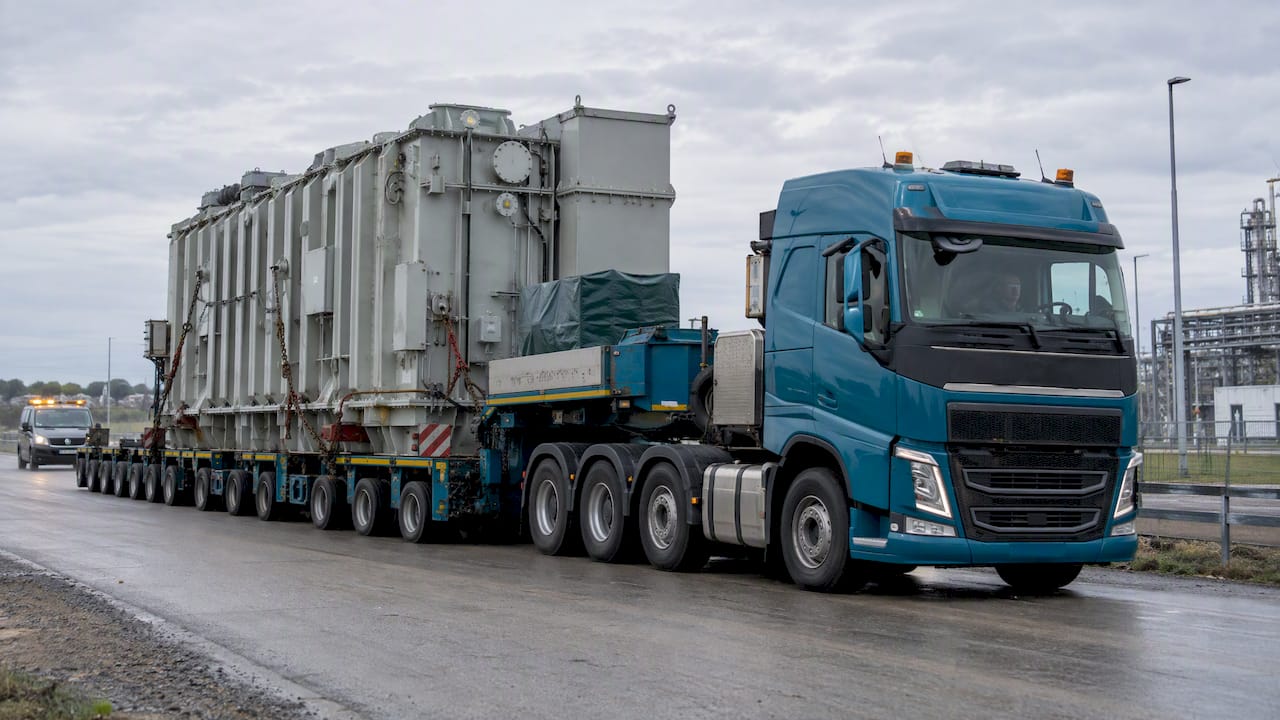
Use the UPS Freight Quote tool for a full landed cost, and run the UPS Chargeable Weight Calculator first if your shipment is dense or bulky. Freight pricing kicks in once a shipment tops roughly 150 pounds or exceeds standard parcel dimensions, at which point palletized LTL or FTL rates apply instead of parcel rates. Freight class, sourced from NMFTA standards, and a recent industry general rate increase near 5.9% both move the final number more than shippers expect. A platform like Or-ner can also pull multi-carrier quotes side by side if you want a comparison beyond UPS alone.
- Parcel tools stop being reliable past 150 lbs or 108 inches on the longest side.
- Freight class and density, not just weight, set your base rate.
- GRIs and fuel surcharges shift the quote even when your shipment doesn’t change.
Pro Tip: Measure your pallet at its tallest point, including the pallet itself, and round up to the nearest inch. Under-measuring by even two inches is a common reason quotes get rebilled after pickup.
Key Takeaways
Accurate UPS freight pricing starts with a chargeable weight calculation, not a quote request, because carriers always bill the greater of actual or dimensional weight.
| Point | Details |
|---|---|
| Run chargeable weight first | Calculate dimensional weight before requesting a full freight quote to avoid billing surprises. |
| Know your divisor | Parcel formulas often use 139; freight examples sometimes use 194, so confirm which applies. |
| Freight class drives cost | Density-based classification set by NMFTA standards affects your base rate more than weight alone. |
| Budget for accessorials | Liftgate, residential delivery, and fuel surcharges routinely get left off initial estimates. |
| Compare before booking | Or-ner lets you quote UPS alongside other carriers and book from the same dashboard. |
Table of Contents
- Which UPS Freight Calculator Should You Use?
- How Do You Calculate Chargeable Weight for Freight?
- Step-by-Step: Getting a Quote You Can Trust
- What Actually Drives the Price on a UPS Freight Quote?
- LTL, FTL, or Air and Ocean: Which Mode Fits Your Shipment?
- How Or-ner Speeds Up Quoting and Booking UPS Freight
- Common Mistakes That Inflate a UPS Freight Quote
- Editorial Take: What the Data Actually Supports
- Get UPS Freight Quotes and Book Faster With Or-ner
- Sources
- FAQ
Which UPS Freight Calculator Should You Use?
UPS splits this job into two distinct tools, and using the wrong one wastes time.
- UPS Chargeable Weight Calculator returns a billable weight only. Feed it length, width, height, and actual weight, and it tells you whether the carrier will bill you on actual or dimensional weight. It doesn’t ask for freight class, origin, or destination.
- UPS Freight Quote returns a dollar estimate. It needs origin and destination zip codes, pallet count, weight per pallet, freight class or commodity description, and any accessorials like liftgate or residential delivery.
Run the chargeable weight calculator first for a single pallet or a quick sanity check on density. Move to the full Freight Quote tool once you have more than one pallet, need a landed cost for budgeting, or are comparing LTL against a full truckload. If you only need a ballpark before your team commits to packaging, chargeable weight alone will get you there faster. Booking is a separate step from quoting. The Freight Shipping Guide covers both, but a quote number does not lock in a truck until you submit a bill of lading.
How Do You Calculate Chargeable Weight for Freight?
Carriers bill whichever number is bigger: your shipment’s actual weight or its dimensional weight. This is the single most misunderstood part of freight pricing, and it’s why a light, bulky shipment can cost more than a dense, heavy one.
The dimensional weight formula multiplies length by width by height in inches, then divides by a carrier-set divisor. Parcel shipments commonly use a divisor of 139, while some freight and LTL examples use a divisor of 194 instead.
Here’s a worked example. Say you have a pallet measuring 48 inches by 40 inches by 60 inches, weighing 400 pounds actual.
- Cubic size: 48 × 40 × 60 = 115,200 cubic inches
- Using a 194 divisor: 115,200 ÷ 194 = 594 lbs dimensional weight
- Since 594 lbs is greater than the 400 lbs actual weight, the carrier bills you on 594 lbs
Pro Tip: Measure before you shrink-wrap and palletize, not after. Loose packaging materials and uneven stacking can add several inches to your final dimensions, and those inches get billed whether you meant to include them or not.
Step-by-Step: Getting a Quote You Can Trust
Getting a number that survives contact with the actual pickup takes a specific order of operations. Skip a step and you’ll be fielding a rebill later.
- Measure every pallet at its tallest and widest points, in inches, including any overhang or non-uniform stacking.
- Weigh each pallet on a certified scale rather than estimating from product specs, since packaging and pallets themselves add weight.
- Assign a freight class or gather your commodity description, since UPS and most LTL carriers price around NMFC class and density rather than weight alone.
- Run the UPS Chargeable Weight Calculator using your measurements to confirm whether you’re being billed on actual or dimensional weight.
- Submit the Freight Quote with origin and destination zip codes, pallet count, per-pallet weight, freight class, and any known accessorials like liftgate or limited-access delivery.
- Compare the CWT-based estimate against the minimum charge the tool returns, since small shipments often get billed at the carrier minimum instead of the calculated rate.
A quick checklist before you start: dimensions per pallet, weight per pallet, pallet type (standard 48×40 or oversized), number of pieces, and any commodity hints that affect NMFC class. Missing any one of these means an incomplete quote that the carrier will revise once the shipment is actually inspected.
For a two-pallet shipment at 500 lbs and 600 lbs respectively, both classed at 85, expect the tool to return a CWT rate applied to the combined chargeable weight, then compared against a flat minimum charge, often whichever is higher. If the calculated rate falls below the minimum, you pay the minimum. Once the number looks right, you can book directly through UPS or export the quote into Or-ner to stack it against other carrier options before committing.
What Actually Drives the Price on a UPS Freight Quote?
The headline number on a freight quote is rarely the whole story. Several line items get added, and missing one is how a $400 estimate turns into a $600 invoice.
- Base rate, priced per hundredweight (CWT) or as a flat lane rate for common routes.
- Freight class and density, since carriers shifted toward density-based classification in mid-2025, meaning the same commodity can land in a different class depending on how tightly it’s packed.
- Fuel surcharge (FSC), recalculated weekly against a diesel price index and applied as a percentage of the base rate.
- Accessorials, including liftgate service, residential delivery, inside pickup, and appointment scheduling, each billed as a flat add-on.
- Minimum charge, the floor rate a carrier applies regardless of how small the calculated CWT price comes out.
- Declared value and liability coverage, which adds cost if you need protection above the carrier’s standard liability limit.
Reclassification is the accessorial nobody budgets for. If your declared freight class doesn’t match what the carrier’s inspector measures at the dock, they rebill you at the correct class plus a reclass fee. Getting your freight class selection right upfront avoids that entirely.
Freight class and density together, not weight alone, are what most shippers get wrong when a quote comes in lower than the final invoice.
Fuel surcharges vary regionally too. Diesel prices swing by state, and if you’re running your own fleet legs alongside carrier freight, it’s worth checking regional commercial fuel pricing before locking in a lane rate. When you get a quote back, ask the carrier or broker specifically what’s excluded, since liftgate and residential fees are the two most commonly left off an initial estimate.
LTL, FTL, or Air and Ocean: Which Mode Fits Your Shipment?
Mode selection changes both your weight basis and how fast the shipment moves, and picking wrong on either axis costs you.
| Mode | Weight basis | Speed | Booking style | Typical use case |
|---|---|---|---|---|
| LTL | Chargeable weight (actual vs. dimensional) | 2 to 5 business days regionally | Quote then book per shipment | Partial pallets sharing truck space |
| FTL | Actual weight, flat truck rate | 1 to 3 business days | Dedicated truck booking | Multiple pallets filling a trailer |
| Air freight | Actual or dimensional, whichever is greater | 1 to 3 days | Quote per lane, expedited booking | Time-sensitive, lower-volume cargo |
| Ocean freight | Volume (cubic meters) or weight | 20 days or more depending on route | Container booking, longer lead time | High-volume, non-urgent international cargo |
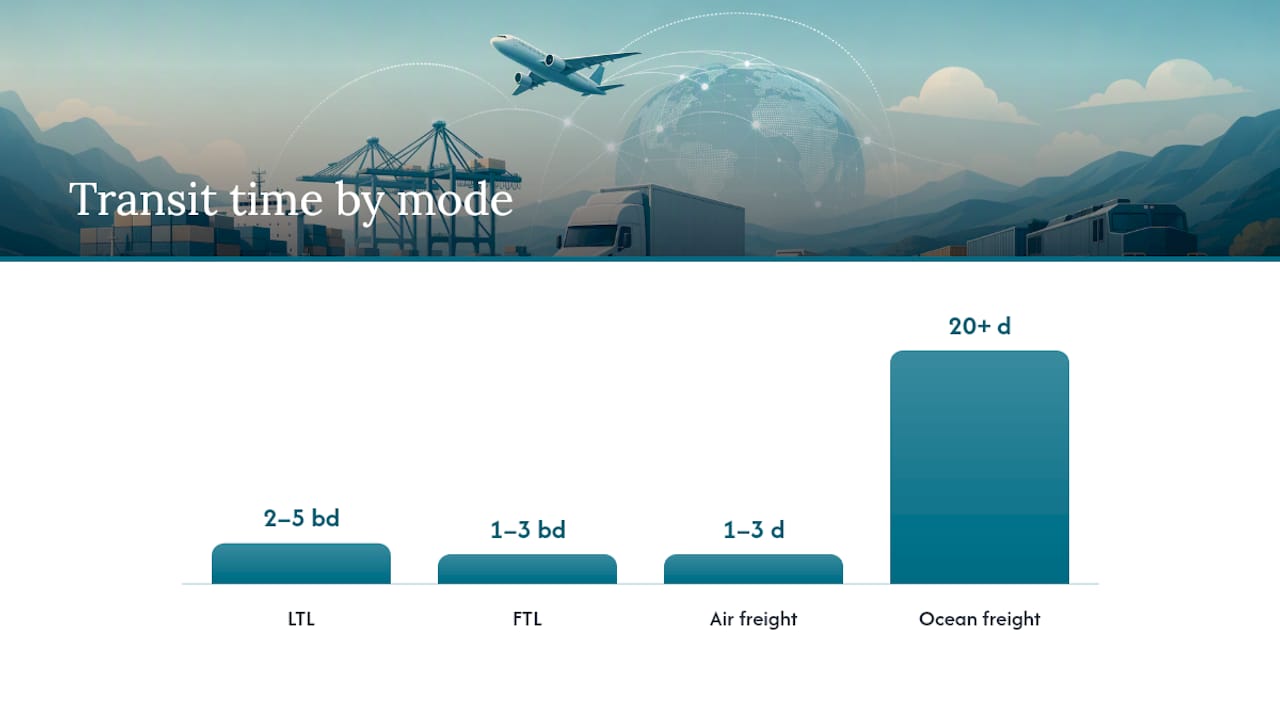
Choose LTL when you’re shipping one or two pallets and don’t need the entire trailer. FTL becomes cheaper once you’re filling six or more pallets, since you stop paying a per-pallet freight class premium and instead pay a flat truck rate. Air freight makes sense when transit time outweighs cost, typically for smaller, higher-value shipments. Ocean freight wins on cost per unit for large volume but only if your timeline tolerates weeks, not days. Lane density matters here too: high-traffic routes between major metro hubs tend to carry lower LTL rates simply because carriers run more trucks on them.
How Or-ner Speeds Up Quoting and Booking UPS Freight
Running the UPS calculators manually works fine for a single shipment. It gets tedious fast once you’re quoting multiple lanes a week or comparing UPS against other carriers for the same pallet.
Or-ner’s platform builds the same DIM and density calculations into a quoting dashboard that pulls multiple carrier rates at once, so you’re not re-entering pallet dimensions into three separate tools.
- Multi-carrier quoting returns UPS alongside other freight options for the same shipment profile, so you can compare landed cost in one view.
- Built-in DIM and density calculators auto-flag when a shipment will bill on dimensional weight before you submit a quote request.
- NMFC and freight class lookup populates automatically from your commodity description, reducing the reclassification risk that comes from guessing.
- Accessorial management tracks which fees applied to which shipment, useful when you’re auditing invoices against quotes later.
- Booking and tracking happen in the same workflow, so a quote doesn’t require jumping to a separate carrier portal to confirm pickup.
A typical workflow looks like this:
- Enter pallet dimensions and weight once.
- Compare quoted lanes across carriers, including UPS.
- Select the service level that fits your timeline and budget.
- Book the shipment and receive tracking automatically.
- Get flagged on exceptions like delays or accessorial disputes before they become invoice surprises.
If you want the fuller mechanics of how that booking step works end to end, the freight quote process guide walks through it in more detail.
Common Mistakes That Inflate a UPS Freight Quote
Most quote surprises trace back to a handful of repeat offenses, all fixable before you submit anything.
- Under-measuring pallet height leads to a low dimensional weight estimate; measure the tallest point of the load, including any overhang, not just the pallet deck.
- Guessing at freight class instead of calculating density invites reclassification; know your commodity’s actual density before you declare a class.
- Forgetting accessorials at quote time like liftgate or residential delivery means they show up as surprise line items on the invoice instead.
- Mixing up DIM divisors between parcel (139) and freight (194) formulas produces a chargeable weight that doesn’t match what the carrier actually bills.
- Skipping a certified scale weigh-in and relying on estimated product weight invites a reweigh fee once the carrier catches the discrepancy.
Pro Tip: Keep a running log of your actual invoiced freight class versus what you originally declared. If you’re consistently getting reclassified upward, your density calculation method needs a fix, not just your next shipment.
Before submitting any quote, confirm you have: exact pallet dimensions, certified weight, freight class or density calculation, pallet count, and a list of accessorials you know you’ll need. A pre-quote checklist catches most of these gaps before they become invoice disputes.

Editorial Take: What the Data Actually Supports
Most advice on this topic treats the UPS Freight Quote as the starting point. That’s backward. The chargeable weight calculation should come first, every time, because it determines whether you’re even quoting the right category of shipment. Skip it, and you risk requesting an LTL quote for something that reweighs into a different class entirely, or worse, discovering mid-transit that your “parcel” shipment should have been freight from the start.
The conventional wisdom also underrates how much freight class costs shippers who never learn to calculate density themselves. Declaring a class based on a rough guess, rather than an actual density calculation, is the single most avoidable line item on a freight invoice. Carriers audit dock-side, and the burden of proof sits with the shipper.
What should change first: build density calculation into your quoting habit before you ever open a quote tool, not after you get a bill that doesn’t match what you expected. The tools are only as accurate as what you feed them.
Get UPS Freight Quotes and Book Faster With Or-ner
Running UPS’s calculators manually works for one shipment. It stops scaling the moment you’re quoting five lanes a week and need to compare UPS against other options without re-typing the same pallet dimensions three times.
Or-ner brings multi-carrier quoting, automatic density and freight class calculations, and booking into one dashboard, so the estimate you generate is the same number you get invoiced. That matters most for sellers managing recurring freight lanes, where a manual quote-then-book process eats hours every week that a single platform handles in minutes. If you’re ready to move from estimate to actual booking, the step-by-step freight booking guide walks through setting up your first shipment on Or-ner, from entering pallet details to confirming pickup.
Sources
- Freight Shipping Guide | UPS Supply Chain Solutions – United States
- Parcel or Freight? A Guide to Costs and Rules
- Parcel vs Freight: Weight Limits, Costs, and Rules – LegalClarity
- LTL Pricing: Key Factors That Shape Your Shipping Costs
FAQ
Is UPS or FedEx Freight Cheaper?
Cost depends on your specific lane, freight class, and accessorials rather than a fixed carrier advantage; running quotes from both carriers, or comparing them together on a platform like Or-ner, is the only reliable way to know which is cheaper for your shipment.
Does UPS Have a Freight Option?
Yes, UPS offers freight service for shipments too large or heavy for parcel through UPS Supply Chain Solutions, covering LTL, FTL, air, and ocean options via its freight shipping guide.
How Does UPS Charge by Weight or Size?
UPS bills whichever is greater between actual weight and dimensional (chargeable) weight, calculated by dividing cubic size by a carrier-specific divisor that differs between parcel and freight shipments.
How Much Does UPS Charge to Ship 20 Pounds?
A 20 pound shipment typically falls under parcel rather than freight pricing, since freight applies once shipments approach the roughly 150 pound threshold; use the standard parcel rate tools rather than a freight calculator for shipments this light.