TL;DR:
- Efficient shipment tracking relies on centralized platforms, webhooks, and proactive notifications to reduce customer inquiries and manual checks. Technologies like barcode scanning, GPS, and RFID generate real-time data that can be consolidated into unified dashboards, enhancing visibility across multiple carriers. Implementing automated alerts and translating carrier status codes into plain language helps resolve issues quickly and improves customer satisfaction.
Efficient shipment tracking is defined as a centralized, automated process that delivers real-time status updates across multiple carriers without manual intervention. For ecommerce sellers and logistics managers, knowing how to track shipments efficiently separates operations that scale from ones that drown in customer complaints. Tools like AfterShip, ShipStation, and Route have made multi-carrier visibility accessible, but the real gains come from combining these platforms with event-driven technologies like webhooks and proactive notification workflows. This guide covers the technologies, setup steps, common failure points, and platform comparisons you need to build a tracking system that actually works in 2026.
What technologies and tools enable efficient shipment tracking?
The foundation of any tracking system is barcode scanning. Barcode scanning at each checkpoint generates timestamped location data uploaded wirelessly to tracking databases in near real time. That data feeds push notifications at key delivery milestones, from pickup to final delivery.

GPS and RFID extend that visibility beyond fixed scan points. GPS tracks vehicles in transit, while RFID in warehousing monitors inventory movement without line-of-sight scanning. Together, these technologies close the gaps that barcode-only systems leave open, especially for high-value or time-sensitive freight.
Multi-carrier tracking platforms sit on top of these technologies and consolidate data from dozens of carriers into one view. AfterShip, ShipStation, and 17Track each pull carrier feeds into a unified dashboard, so your team stops logging into separate carrier portals.
Apis vs. webhooks: which update method is better?
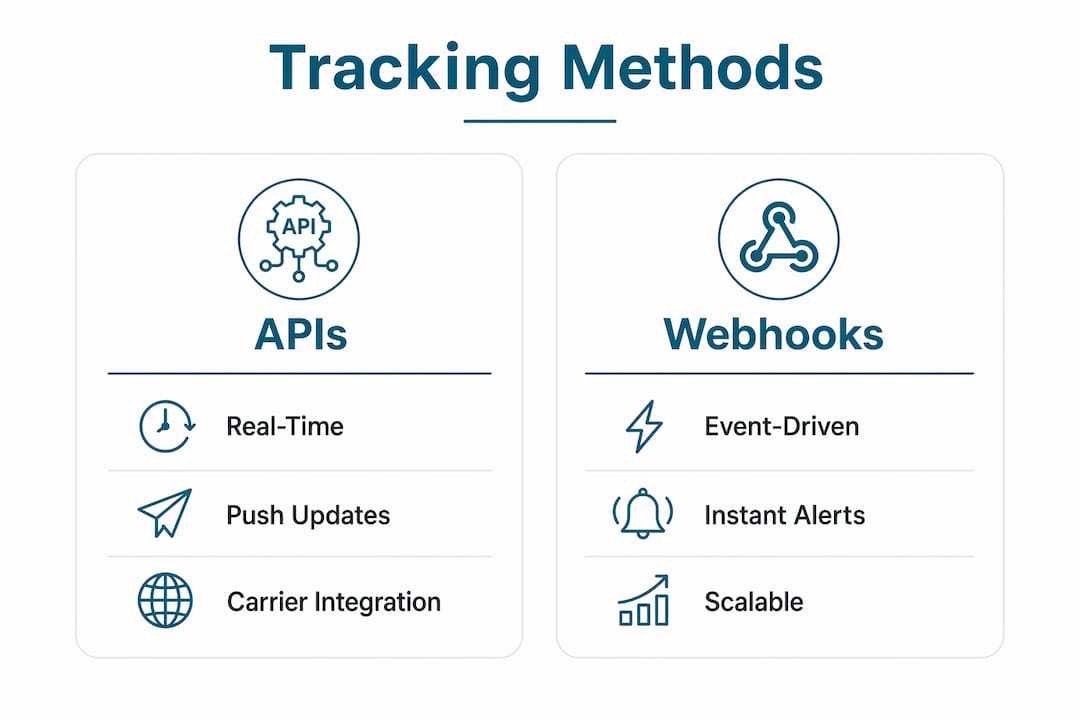
The difference between APIs and webhooks is the difference between asking and being told. A polling-based API requires your system to repeatedly request status updates at set intervals. A webhook pushes an update to your system the moment a tracking event occurs.
Webhook-based tracking provides near-real-time updates by sending events as they happen, which improves both tracking timeliness and customer experience. That speed advantage compounds across thousands of daily shipments. Polling introduces lag; webhooks eliminate it.
- Barcode scanning: Generates timestamped location data at every checkpoint
- GPS tracking: Monitors vehicle location between fixed scan points
- RFID: Enables passive, hands-free inventory and shipment monitoring
- Multi-carrier platforms: Consolidate carrier feeds into one dashboard (AfterShip, ShipStation, 17Track)
- Webhooks: Push event-driven updates instantly, replacing slow polling cycles
- APIs: Useful for on-demand queries and building custom tracking interfaces
Pro Tip: When evaluating platforms, check whether they support webhook subscriptions per carrier event type. Granular subscriptions reduce noise and let you trigger only the notifications that matter.
How to set up an efficient shipment tracking system
Building a reliable tracking system takes more than signing up for a platform. The setup sequence matters because each layer depends on the one before it.
-
Choose a centralized multi-carrier platform. Start with a tool that supports your carrier mix. AfterShip covers 1,100-plus carriers. ShipStation integrates with major U.S. and international carriers and connects directly to Amazon, Shopify, and WooCommerce storefronts. Confirm the platform supports bulk tracking before committing.
-
Integrate carrier APIs and configure webhook endpoints. Connect each carrier’s API to your platform. Then set up webhook endpoints on your server to receive event pushes. Webhook integrations require defensive coding, including retry logic with exponential backoff and idempotent processing to prevent duplicate status updates from corrupting your data.
-
Build a centralized tracking dashboard. Configure your dashboard to display shipment status, carrier, estimated delivery date, and exception flags in one view. AfterShip supports bulk tracking of up to 50 packages simultaneously, which is the kind of capacity that makes a real difference when you’re managing hundreds of daily orders.
-
Automate proactive customer notifications. Set triggers for key events: order packed, shipped, out for delivery, delivered, and delayed. Automating notifications at key events significantly reduces support tickets by giving customers the information they need before they ask for it.
-
Design scan-gap alert logic. Define a threshold, such as no carrier scan for 24 hours, and configure an automatic alert to your team and the customer. This catches stalled shipments before they become complaints.
Pro Tip: Map your carrier status codes to a small set of internal labels before you build notifications. Sending raw carrier codes like “INBND” or “PCKUP” to customers creates confusion. Translate them into plain language first.
Centralized tracking platforms reduce the operational overhead of managing multiple carriers by giving your team a single source of truth. That single view also makes exception management faster because your team spots problems without switching between systems.
What common challenges arise in shipment tracking?
Even well-built tracking systems hit operational friction. Knowing where the failures cluster helps you fix them faster.
Missing scans and scan gaps are the most common issue. A package moves between facilities without being scanned, and your system shows no update for hours or days. Scan-gap logic that triggers alerts when shipments show no movement lets you notify customers proactively rather than waiting for them to call.
Webhook failures are the second major failure point. Webhooks can fail due to server downtime, timeouts, or payload errors. Best practices include verifying webhook signatures, storing persistent event IDs, and writing idempotent handlers so that duplicate retries do not create duplicate status records. Retry attempts of up to 14 rounds with exponential backoff are standard in production-grade integrations.
Inconsistent carrier status codes create a third layer of complexity. Different carriers use different terminology for the same event. Mapping 750-plus global carrier codes to a standardized set of business-relevant triggers prevents noisy, inconsistent messaging that confuses customers and overwhelms support teams.
Reducing WISMO (Where Is My Order?) calls requires more than a tracking number. It demands proactive, clear, and timely communication that anticipates customer questions before they form. Source: WISMOlabs
Best practices for exception communication:
- Notify customers within one hour of detecting a delay or exception
- Use plain language, not carrier jargon
- Include a revised estimated delivery date whenever possible
- Provide a direct contact channel for escalations
- Log every exception event for post-shipment analysis
Which shipment tracking platforms offer the best features?
The right platform depends on your carrier mix, order volume, and technical capacity. The table below compares the leading options on the features that matter most for ecommerce efficiency.
| Platform | Multi-Carrier Support | Bulk Tracking | Webhook/API | Notification Automation | Best For |
|---|---|---|---|---|---|
| AfterShip | 1,100-plus carriers | Up to 50 at once | Yes, full webhook support | Yes, customizable triggers | High-volume ecommerce |
| ShipStation | Major U.S. and global carriers | Yes | Yes | Yes, WISMO reduction focus | Multichannel sellers |
| 17Track | 2,500-plus carriers | Yes | Yes | Limited | International shipments |
| Route | Select carriers | No | Limited | Yes, package protection focus | DTC brands |
AfterShip leads on raw carrier coverage and notification customization. ShipStation wins on ecommerce platform integrations, particularly for sellers on Amazon, Shopify, and Etsy. 17Track covers the widest carrier network globally, making it the right choice for cross-border operations. Route adds package protection on top of tracking, which appeals to direct-to-consumer brands managing high-value orders.
Centralized universal tracking dashboards reduce customer service effort by consolidating multi-carrier data into one view. ShipStation reports that this approach cuts “Where’s my order?” messages significantly. That reduction translates directly into lower support costs and faster resolution times.
Pricing scales with volume. AfterShip’s paid plans start at shipment-based tiers, making it cost-effective for sellers processing 200 or more shipments per month. ShipStation charges per user and shipment tier. For sellers evaluating options, the best shipment tracking software comparison on Or-ner covers current pricing and feature breakdowns in detail.
Proactive shipment notifications tied to tracking events decrease WISMO inquiries by 70–90%. That number represents a concrete operational gain. A team handling 500 support tickets per month could realistically cut that to 50–150 tickets with the right notification setup.
Key takeaways
Efficient shipment tracking requires centralized platforms, event-driven webhooks, and proactive notifications working together to eliminate manual checks and reduce customer inquiries.
| Point | Details |
|---|---|
| Centralize multi-carrier data | Use platforms like AfterShip or ShipStation to consolidate all carrier feeds into one dashboard. |
| Choose webhooks over polling | Webhooks push real-time event updates, eliminating the lag that polling-based APIs introduce. |
| Automate customer notifications | Trigger alerts at key events to cut WISMO calls by as much as 70–90%. |
| Build scan-gap alert logic | Set a no-scan threshold to detect stalled shipments before customers notice. |
| Normalize carrier status codes | Map raw carrier codes to plain-language labels for consistent, clear customer messaging. |
Why reactive tracking is costing you more than you think
After working closely with ecommerce operations across multiple verticals, the pattern I see most often is this: teams invest in a tracking platform, set it up once, and then treat it as done. They wait for customers to report problems instead of building systems that surface problems first.
The shift from reactive to event-driven tracking is not a technical upgrade. It is an operational mindset change. When your system detects a scan gap and sends a customer notification before that customer opens a support ticket, you have changed the entire dynamic of the interaction. The customer feels informed rather than ignored. Your support team handles a fraction of the volume.
What I have found actually works is treating webhook reliability as a first-class engineering concern, not an afterthought. Most teams configure webhooks once and assume they work. In practice, webhook failures are silent. A missed retry means a customer never gets a delay notification. Investing time in signature verification, idempotent handlers, and retry monitoring pays back in fewer escalations and cleaner data.
The other thing I push hard on is notification frequency. More is not better. Customers who receive eight status updates for a two-day shipment start ignoring all of them. The goal is to send the right update at the right moment, not to demonstrate that your system is active. Three to five well-timed notifications outperform ten generic ones every time.
For logistics managers handling cross-border shipments, the carrier code normalization step is non-negotiable. A customer in the U.S. receiving a status update that reads “CSTMS_CLR_INTL” has no idea what that means. Translate it. Your order tracking notifications strategy is only as good as the language you use to deliver it.
— Maayan
How Or-ner makes shipment tracking work at scale
Or-ner is built for ecommerce sellers and logistics managers who need more than a basic tracking number lookup. The platform consolidates shipment data across global carriers into a single dashboard, with automated notification workflows that reduce WISMO calls without requiring manual intervention from your team.
Or-ner’s reliable courier services platform supports webhook integrations, multi-carrier visibility, and exception management tools designed for operations moving freight across ocean, air, and land. Whether you are managing 50 shipments a day or 5,000, the infrastructure scales with your volume. If you are ready to move from manual tracking to a system that works while you sleep, Or-ner is worth a close look.
FAQ
What is the most efficient way to track multiple shipments?
The most efficient method is using a multi-carrier tracking platform like AfterShip or ShipStation that consolidates all carrier data into one dashboard with bulk tracking and automated status alerts.
How do webhooks improve shipment tracking?
Webhooks push tracking event updates to your system the moment they occur, eliminating the delay of periodic API polling and delivering near-real-time visibility across all carriers.
How can i reduce “where is my order?” customer inquiries?
Proactive notifications tied to key tracking events, such as shipment packed, delayed, and out for delivery, reduce WISMO calls by 70–90% according to WISMOlabs data.
What should i do when a shipment shows no tracking updates?
Implement scan-gap alert logic that triggers an automatic notification to your team and the customer when no carrier scan is recorded within a defined window, typically 24 hours.
Which shipment tracking software is best for ecommerce sellers?
AfterShip is the top choice for high-volume ecommerce due to its 1,100-plus carrier support and customizable notification triggers. ShipStation is the stronger option for multichannel sellers integrated with Amazon or Shopify.