You can check a Trackon shipment’s live status right now by entering its AWB (10-digit airway bill) at Trackon’s tracking tool or dropping that same number into a multi-carrier aggregator. That’s the whole mechanism. Everything else in this guide is about what to do when the number returns nothing, what the status strings actually mean, and how businesses can stop checking manually altogether.
Two fastest routes:
- Trackon’s own tool or app: Go to the Trackon website, find the Track Shipment field, enter your 10-digit AWB, and hit Track. On mobile, the Trackon Couriers app does the same thing with a POD download button built in.
- Multi-carrier aggregator: Paste the AWB into 17TRACK, AfterShip, or TrackingMore. These work especially well when Trackon’s page loads slowly or shows no results.
If you get no results: Double-check the AWB format (10 digits, no letters), try your order or reference number instead, confirm the sender actually handed the parcel to Trackon, or contact the sender directly before calling Trackon support.
Pro Tip: If you received a marketplace order ID (like an Amazon order number), that is NOT the AWB. Ask the seller for the Trackon consignment number specifically.
Key Takeaways
The fastest way to check a Trackon shipment is to enter the 10-digit AWB at Trackon’s website or app, then fall back to a multi-carrier aggregator if the official tool returns no results.
| Point | Details |
|---|---|
| AWB format | Trackon AWBs are exactly 10 digits; no letters or spaces — wrong format causes blank results. |
| Two-step fallback | Try Trackon’s tool first, then paste the same AWB into 17TRACK or TrackingMore if it shows nothing. |
| Normal gap windows | Air transit (5–14 days) and customs (1–7 days) silences are expected, not errors. |
| Status escalation | Contact the sender before Trackon support; include AWB, pickup date, and last known status. |
| Or-ner for merchants | Or-ner’s platform automates webhook notifications and POD collection, removing manual tracking for sellers. |
Table of Contents
- Where do you find your Trackon AWB or consignment number?
- How do you track a shipment on Trackon’s website and app?
- How do international handoffs affect Trackon tracking updates?
- When should you use a third-party tracker for Trackon AWBs?
- What do common Trackon tracking statuses actually mean?
- What should you do when Trackon tracking isn’t updating?
- How can businesses automate Trackon tracking into their systems?
- Trackon’s tracking reliability: what US shippers should actually expect
- Merchants who want tracking on autopilot
- Sources
- FAQ
Where do you find your Trackon AWB or consignment number?
Your AWB is the key that unlocks every tracking query. Without the right number in the right format, every tracker returns blank.
Common places it appears:
- Booking receipt or invoice from the sender or logistics provider
- Shipping label on the parcel itself, usually labeled “AWB No.” or “Consignment No.”
- SMS or email confirmation sent at the time of booking
- Seller/merchant order page on platforms like Amazon, Flipkart, or a direct ecommerce store
- Courier pickup receipt given to the sender at collection
The label terminology varies. You might see “AWB number,” “consignment number,” “reference number,” or “tracking number” — they all point to the same 10-digit numeric string. A typical AWB looks like: 1234567890. No letters, no hyphens, exactly 10 digits, as confirmed by public tracking guides.
Pro Tip: When a marketplace shows an internal order ID (e.g., “ORD-2026-XXXX”), scroll to the shipping details section. The Trackon AWB is usually listed separately under “Courier Tracking Number.” For returns or reverse-logistics shipments, a brand-new AWB is generated — the original outbound AWB will not show return status.
How do you track a shipment on Trackon’s website and app?
Tracking on the Trackon website
- Go to the Trackon Couriers website and locate the Track Shipment field on the homepage.
- Select your input type: AWB number or reference/order number.
- Enter the number and click Track.
- The results page shows a timeline of scan events: Booked, Picked Up, In Transit, Out for Delivery, and Delivered (or the current last-known status).
For multiple shipments, use the batch/multiple-tracking input to paste several AWBs at once — useful if you’re a seller checking a day’s worth of consignments.
Tracking on the Trackon mobile app
The Trackon Couriers app covers Standard, Prime Track, and International shipments. Key features beyond basic status:
- POD download: Once a shipment is delivered, a Proof of Delivery document is available directly in the app. Recipients and senders can both access this.
- Branch search: Find the nearest Trackon branch by pincode — handy when a parcel is held for pickup.
- Volumetric weight calculator: Useful for sellers calculating dimensional weight before booking.
- Transporter ID / GST ID lookup: Required for business compliance in India.
Prime Track shipments display guaranteed delivery metadata alongside the standard scan timeline, so you can see whether the consignment is on schedule against its committed window.
Pro Tip: For merchants managing bulk AWBs, the multiple-tracking mode on the website lets you paste up to several numbers at once. If you need transporter or GST ID details for a shipment, the app surfaces those without a separate lookup.
How do international handoffs affect Trackon tracking updates?
Scan gaps during international transit are normal and do not automatically mean a parcel is lost. Two windows account for most “no update” periods:
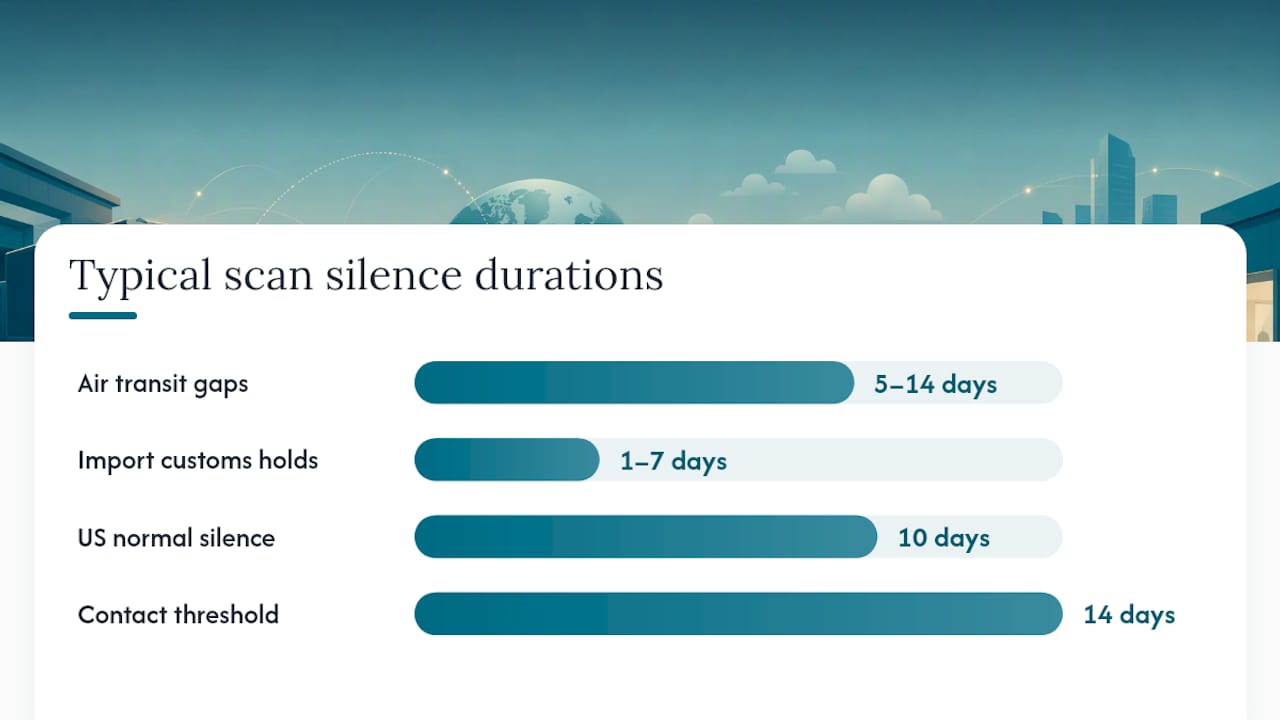
- Air transit gaps: Once a parcel clears origin and boards an international flight, scan events typically pause for 5–14 days depending on the route. The parcel is moving; it just isn’t being scanned at intermediate points.
- Import customs holds: At the destination country, customs processing can pause visible updates for 1–7 days. This is standard procedure, not an exception.
How to track across a handoff:
- Keep using the same AWB on Trackon’s tool first. Trackon often retains scan data through the origin leg.
- Once the parcel clears customs and transfers to a destination carrier, switch to an aggregator like TrackingMore or 17TRACK. These platforms can display the combined origin-and-destination timeline under a single AWB.
Pro Tip: For US-based recipients expecting an international consignment from India, treat a 10-day silence after the “Departed Origin” scan as normal. If 14 days pass with no update and the aggregator also shows nothing, that’s the right moment to contact the sender and ask them to open an inquiry with Trackon.
When should you use a third-party tracker for Trackon AWBs?
Third-party multi-carrier trackers are worth using when Trackon’s own tool is slow, returns no results, or when you need a combined view across multiple carriers. Public tracking guides recommend trying a universal tracker as a fallback whenever the official page comes up blank.
Reliable aggregators that support Trackon AWBs:
- 17TRACK: Strong global coverage, clean interface, good for individual recipients.
- AfterShip: Popular with ecommerce sellers; integrates with Shopify and other platforms.
- TrackingMore: Developer-friendly, with API and webhook support for merchants who want programmatic updates.
- Parcel Monitor: Good for cross-border shipments with multi-leg timelines.
- Ship24: Useful for auto-detecting the carrier when you’re unsure which leg is active.
How to use them:
- Copy your 10-digit Trackon AWB.
- Paste it into the aggregator’s search field.
- If “carrier autodetect” is available, select it — the platform will identify Trackon automatically.
- For merchants tracking many shipments, use the bulk upload feature (CSV or API call).
Individual recipients: use the web interface. Sellers managing dozens of daily shipments: connect an aggregator API to your order management system so status updates push automatically rather than requiring manual checks. For a side-by-side look at tracking software options, Or-ner’s comparison guide covers the main platforms.
What do common Trackon tracking statuses actually mean?
| Status | What it means | Action needed? |
|---|---|---|
| Shipment Booked | Booking created; parcel not yet collected | None — wait for pickup scan |
| Picked Up | Trackon collected the parcel from sender | None |
| In Transit | Moving between hubs | None |
| Out for Delivery | On the delivery vehicle today | Be available to receive |
| Customs | Held at import customs | None unless customs contacts you |
| Exception | Delivery attempt failed or address issue | Contact sender or Trackon |
| Delivered | Delivered; POD available | Download POD if needed |
| RTO Initiated | Return to origin started | Contact sender to rebook |
| RTO Delivered | Parcel returned to sender | Coordinate reshipment with sender |
“Shipment Booked” and “Picked Up” are two distinct events. A booking confirmation does not mean Trackon has the parcel yet. If you see “Booked” for more than 24 hours, the sender may not have handed it over.
An “Exception” status covers a range of scenarios: failed delivery attempt, wrong address, recipient unavailable, or a customs query. The next step is always to contact the sender first — they have the account relationship with Trackon and can get specifics faster than a recipient calling support cold.
What should you do when Trackon tracking isn’t updating?
Work through this checklist before escalating:
- Recheck the AWB format. Confirm it’s exactly 10 digits with no spaces or letters.
- Try your reference or order number if the AWB returns nothing — some bookings index by reference first.
- Paste the AWB into a universal tracker (17TRACK or TrackingMore) to see if scans appear there.
- Confirm the pickup date with the sender. If the parcel was booked but not yet collected, no scans will exist.
- Wait out normal gap windows. Air transit (5–14 days) and customs (1–7 days) are expected silences.
- Contact the sender. They can check the Trackon business dashboard or call their account manager.
- Contact Trackon support directly only after the sender has confirmed the parcel was collected and the gap exceeds the normal window.
When you contact the sender or Trackon, include: AWB number, sender name, pickup date, destination, and the last status shown. That information cuts resolution time significantly. For a broader shipment tracking workflow, Or-ner’s operational guide covers escalation frameworks across carriers.
Pro Tip: Merchants should open investigations through the Trackon business dashboard rather than the consumer support line. Business accounts typically get faster responses and can attach booking records directly to the inquiry.

How can businesses automate Trackon tracking into their systems?
Manual tracking doesn’t scale past a few dozen daily shipments. The three practical integration paths:
- Trackon business portal: Bulk AWB uploads, dashboard views, and account-level reporting. Good starting point for sellers not ready to build API connections.
- Aggregator API (TrackingMore, AfterShip): Both offer developer-friendly webhooks that push scan events to your system the moment they occur. AfterShip’s Shopify app integrations show how merchants connect multi-carrier tracking directly into their storefront notifications.
- Or-ner’s fulfillment platform: For merchants who don’t want to build and maintain webhook infrastructure themselves, Or-ner handles the integration layer, including aggregated tracking dashboards and automated POD collection.
Implementation checklist:
- Map your AWB fields from your order management system to the tracker’s API input.
- Configure scan-event webhooks to fire on status changes (at minimum: Picked Up, Out for Delivery, Delivered, Exception).
- Set up customer-facing email or SMS notifications triggered by those webhooks.
- Test POD retrieval and confirm your retention window — TrackingMore notes that some aggregators hold records for around 75 days.
- Build an exception queue for “Exception” and “RTO Initiated” statuses so your support team sees them immediately.
Pro Tip: If you’re on Shopify, an aggregator app handles most of this without custom code. If you’re on a custom platform or managing cross-border shipments across multiple carriers, a dedicated real-time logistics data layer is worth the setup time.
Trackon’s tracking reliability: what US shippers should actually expect
Trackon holds ISO 9001:2008 and ISO 14001:2004 certifications, which signal process discipline at the operational level. For domestic India shipments, scan frequency is generally solid. The honest picture for US-based recipients of international consignments is different.
The origin leg (India domestic to airport) typically scans well. The international air leg goes quiet. US customs adds another silence. Then a destination carrier picks it up and scans under a different system. Expecting continuous updates through all four legs is unrealistic with any carrier, not just Trackon.
What actually matters: knowing which silences are normal (air transit, customs) versus which ones signal a real problem (no update 14-plus days after departure, or an “Exception” with no follow-up). The parcel tracking mechanics behind these handoffs are worth understanding if you ship internationally at volume. Escalating too early wastes everyone’s time. Escalating too late costs you the investigation window.
Merchants who want tracking on autopilot
Checking AWBs one by one is fine for occasional shipments. For sellers moving volume, it’s a support-ticket factory. Or-ner’s courier services for small businesses include webhook-driven tracking automation, aggregated dashboards across carriers, and automated POD collection — so your team sees exceptions, not a feed of “In Transit” updates that require no action.
Two concrete differences versus building it yourself: your customers get delivery notifications without you writing a single line of webhook code, and your support team gets an exception queue instead of a manual tracking spreadsheet. For businesses shipping cross-border, Or-ner’s platform handles the carrier handoff visibility that individual aggregator accounts miss. Get started at Or-ner’s reliable courier services page.
Sources
- Trackon Couriers – Apps on Google Play
- Trackon Courier Tracking – TrackingMore
- Trackon Tracking: Real-Time Guide to Track Any Trackon Courier Shipment
- Apps
FAQ
What is a Trackon AWB number and where do I find it?
A Trackon AWB (airway bill) is a 10-digit numeric tracking ID assigned at booking. Find it on your shipping label, booking receipt, SMS confirmation, or the seller’s order page under “Courier Tracking Number.”
Why does my Trackon tracking show no updates for several days?
Air transit gaps of 5–14 days and customs holds of 1–7 days are normal and do not indicate a lost parcel. If 14-plus days pass after a “Departed Origin” scan with no update on Trackon or an aggregator, contact the sender to open an inquiry.
Can I track a Trackon shipment on third-party apps?
Yes. Paste your 10-digit AWB into 17TRACK, AfterShip, or TrackingMore — all support Trackon AWBs and can display combined timelines when the parcel transfers to a destination carrier.
What does “RTO Initiated” mean on Trackon?
RTO (Return to Origin) means the delivery attempt failed and the parcel is being sent back to the sender. Contact the sender immediately to arrange redelivery or a corrected address.
How can businesses automate Trackon shipment notifications?
Connect an aggregator API (TrackingMore or AfterShip) to your order management system and configure webhooks for key scan events. Or-ner’s platform offers this as a managed service, including automated POD collection and customer-facing delivery notifications.