TL;DR:
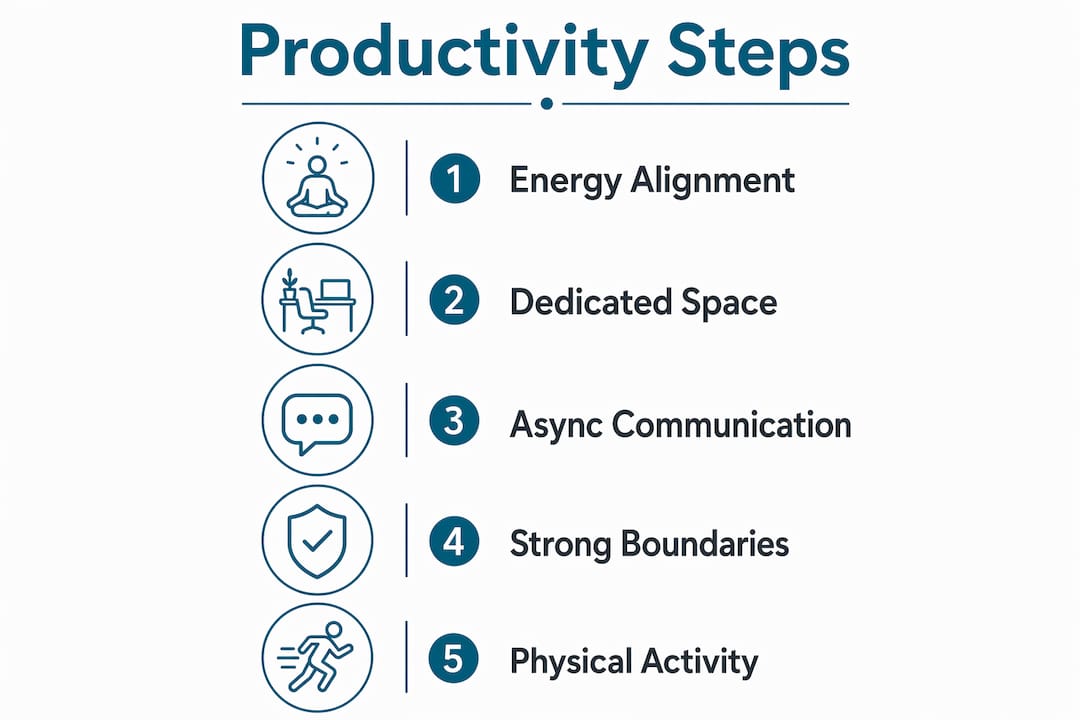
- Remote work productivity depends on managing energy, environment, and communication effectively. Focusing on deep work during peak energy hours and designing a dedicated workspace helps prevent burnout. Utilizing async communication and establishing clear boundaries maintains sustainable remote work habits.
Remote work productivity tips are research-backed strategies that help remote workers and freelancers maximize output, protect focus, and prevent burnout while working outside a traditional office. Remote workers report an 86% burnout rate, compared to 70% for on-site staff. That gap exists because remote work blurs the line between work and rest, making deliberate habits non-negotiable. The three core drivers of remote productivity are time management, environment design, and communication structure. Get all three right, and you work fewer hours with better results.
How can time management and energy alignment boost remote work productivity?
The single most effective time management shift for remote workers is aligning tasks with natural energy, not just filling calendar slots. Most people have a 2–3 hour peak focus window each day. Scheduling deep work during that window, and protecting it aggressively, produces more output than adding extra hours at the end of the day.
Effective remote workers use 90–120 minute deep work blocks scheduled consistently at peak energy, defending them against interruptions. That means no Slack, no email, and no meetings during those windows. The block is sacred.
Here is a practical framework for structuring your day around energy:
- Identify your peak window. Track your focus quality for one week. Most people peak between 9:00 AM and 12:00 PM, but night owls may peak later. Use your actual pattern, not the conventional one.
- Block deep work first. Schedule your most cognitively demanding tasks, writing, coding, analysis, during your peak window before anything else touches the calendar.
- Batch meetings and messages. Group all calls and communication responses into one or two daily windows, typically mid-morning and mid-afternoon. This protects focus blocks on both sides.
- Use the Pomodoro Technique for lighter tasks. For administrative work outside your peak window, 25-minute focused sprints with 5-minute breaks maintain momentum without demanding peak-level concentration.
- End each day with a task preview. Spend five minutes reviewing tomorrow’s priorities. You start the next morning with zero decision fatigue about what to tackle first.
Protecting your best 2–3 hours daily is more effective than increasing total work hours. More hours without focus structure produces diminishing returns fast.
Pro Tip: Block your peak focus window in your calendar as a recurring “meeting” with yourself. Label it “Deep Work” and decline any external request that conflicts with it. Treat it exactly as you would a client call.
For remote logistics professionals managing time-sensitive ecommerce operations, this energy-first scheduling approach applies directly to high-stakes tasks like shipment reviews and vendor coordination.
What are the best practices for designing a productive remote work environment?
Your physical workspace directly controls your ability to focus. A dedicated room or corner used only for work trains your brain to shift into work mode the moment you sit down. Working from the couch or kitchen table collapses the mental boundary between rest and effort.
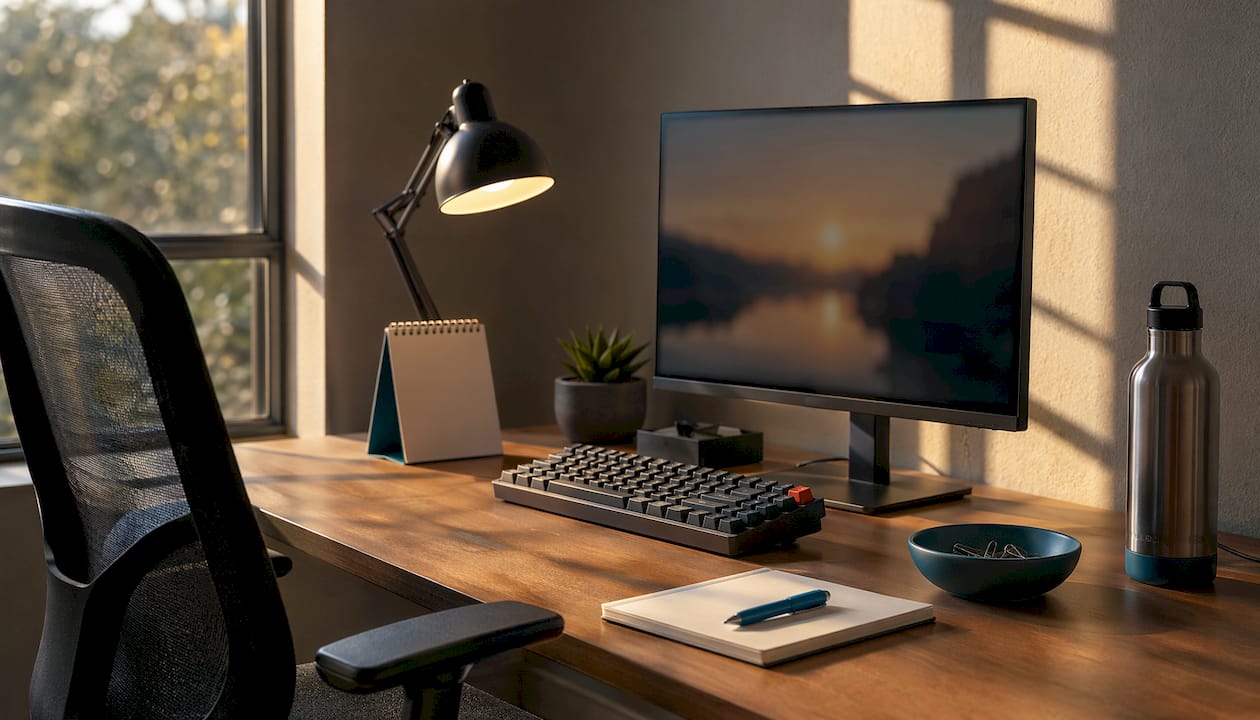
A dedicated, ergonomically sound workspace with natural light and noise controls significantly improves focus and reduces physical fatigue. Ergonomic chairs and monitor stands reduce back and neck strain, which is a real productivity drain that compounds over months.
Key elements of a high-performance remote workspace:
- Dedicated space. Use a separate room or a clearly defined desk area. Never work from your bed or couch if you can avoid it.
- Natural light. Position your desk near a window. Natural light reduces eye strain and supports circadian rhythm, which affects sleep quality and next-day focus.
- Noise control. Noise-canceling headphones are the single most cost-effective focus tool for remote workers in shared living spaces. Pair them with ambient sound apps like Brain.fm or simply white noise.
- One tool per category. Tool sprawl impairs productivity; the most effective setups use one integrated tool per category rather than stacking apps. Pick one project manager, one communication platform, and one document tool. Stop there.
- Movement breaks. Active remote workers report higher mood and performance scores compared to sedentary peers. A five-minute walk every 90 minutes resets focus and reduces the physical cost of desk work.
Pro Tip: Set a recurring phone alarm every 90 minutes labeled “Move.” Stand up, walk to another room, stretch, or do ten squats. This single habit counters the sedentary risk that comes with working 8+ hours at a desk.
Here is a quick comparison of workspace setups by focus impact:
| Setup type | Focus impact | Key advantage |
|---|---|---|
| Dedicated home office | High | Full mental separation from living space |
| Defined desk in shared space | Medium | Consistent location cues without a separate room |
| Coworking space | High | External structure and social accountability |
| Rotating locations (café, couch) | Low | Novelty without consistency undermines deep work |
How to leverage async communication and reduce meeting overload for remote work efficiency?
Asynchronous communication, or async, means exchanging information without requiring both parties to be present at the same time. A recorded video update, a detailed document, or a structured message thread are all async. The opposite is a live meeting, which demands synchronized attention from everyone involved.
Switching to async updates reclaimed 5 hours per week per employee lost to context switching at one SaaS startup. Five hours per week is more than a full workday per month returned to focused output.
Practical steps to build an async-first communication culture:
- Audit your recurring meetings. List every weekly or biweekly call. For each one, ask: “Could this be a document or a short video?” Aggressively cancel recurring meetings that yield few decisions and replace them with brief async updates.
- Use structured documents for status updates. A shared Google Doc or Notion page updated daily replaces the standard Monday standup for most teams.
- Record short video updates. Tools like Loom let you record a 3-minute screen walkthrough instead of scheduling a 30-minute call. The recipient watches it on their schedule.
- Define message urgency levels. Create a simple protocol: email for non-urgent items (24-hour response window), Slack for same-day items, and phone calls for genuine emergencies only. This prevents the “always-on” trap.
- Schedule “Open Office Hours.” Designing Open Office Hours gives teammates a predictable window for real-time questions without random interruptions throughout the day.
Pro Tip: Before scheduling any meeting, write a one-paragraph summary of what you need to decide or communicate. If that paragraph contains the full answer, send it as a message instead. You will cancel at least 30% of your meetings this way.
Async communication requires a cultural shift, not just a software swap. The mindset change, accepting that not every message needs an instant reply, is what makes the time savings real.
For remote teams in logistics, this approach pairs well with managing logistics partners across time zones, where async documentation replaces the need for overlapping work hours.
How to establish strong boundaries and rituals to maintain work-life balance while working remotely?
Clear work-life boundaries are the most underrated productivity tool for remote workers. Without a commute to signal the start and end of the workday, the brain needs deliberate rituals to make those transitions.
55% of remote employees work longer hours than their on-site counterparts. Longer hours without recovery time accelerates burnout, which destroys productivity far more than any distraction.
Here is a boundary-setting framework that works:
- Set fixed start and end times. Choose specific hours and treat them as non-negotiable. Post them in your team’s shared calendar so colleagues know when you are available.
- Create a start ritual. A consistent morning sequence, coffee, a short walk, reviewing your task list, signals to your brain that work has begun. The ritual replaces the commute as a mental transition.
- Build an end-of-day shutdown routine. Close all work tabs, write tomorrow’s top three tasks, and physically close your laptop. Hard stops and visible workspace separation help workers disengage mentally and prevent burnout.
- Communicate your schedule to your household. Tell the people you live with when you are in deep work mode. A simple “do not disturb” sign on your door works better than hoping they guess.
- Turn off work notifications after hours. Responding to Slack late at night increases exhaustion without increasing output. Disable push notifications on your phone after your end time. The messages will still be there in the morning.
Pro Tip: Create a physical “end of work” signal that has nothing to do with screens. Change your clothes, take a ten-minute walk, or make a specific drink. The more sensory and consistent the signal, the faster your brain learns to switch off.
Physical activity and clear boundaries counteract the well-being paradox of remote work, where autonomy and isolation pull in opposite directions. Morning exercise, even a 20-minute walk, sets a positive mood baseline that carries through the workday.
For remote workers in the logistics sector, staying current on industry developments during defined work hours, rather than checking news feeds all day, applies this same boundary principle to information consumption.
Key Takeaways
The most effective remote work productivity system combines energy-aligned time blocking, a dedicated physical workspace, async-first communication, and strict daily boundaries to protect both output and well-being.
| Point | Details |
|---|---|
| Protect your peak focus window | Block 90–120 minutes of deep work daily at your natural energy peak and defend it from interruptions. |
| Design a dedicated workspace | Use a fixed desk with natural light, noise control, and one tool per category to reduce cognitive load. |
| Replace meetings with async updates | Audit recurring calls and substitute structured documents or short video updates to reclaim focus time. |
| Set hard start and end times | Fixed work hours with a shutdown ritual prevent the “always-on” trap that drives remote burnout. |
| Move every 90 minutes | Short physical breaks improve mood and performance, directly countering the sedentary risk of desk work. |
What I’ve learned about sustainable remote productivity after years of working this way
The conventional advice on remote productivity focuses almost entirely on tools. Use this app, try that timer, install this browser extension. After years of working remotely and advising teams across industries, I can tell you the tools are the easy part. The hard part is protecting your time from people who mean well.
The most damaging productivity pattern I see is what I call “collaborative drift.” You start the day with a clear plan. Then a colleague pings you with a quick question, which leads to a call, which leads to a follow-up document, and by noon you have done nothing on your original list. Every individual interruption felt reasonable. The cumulative cost was your entire morning.
The fix is not to become unreachable. It is to make your availability structure explicit. When I started publishing my deep work hours in my team calendar and responding to non-urgent messages in two daily batches, my output on complex projects nearly doubled. My colleagues adjusted within a week. Nobody actually needed instant responses as often as the “always-on” culture implied.
The other thing I would push back on is the idea that more discipline equals more productivity. Remote workers who burn out are usually the most disciplined ones. They work longer, respond faster, and never fully disconnect. The research backs this up: remote workers are 1.51 times more likely to be highly sedentary when working 8+ hours per day. The answer is not more willpower. It is better structure that makes rest automatic, not optional.
Build your day so that stopping is the default, not the exception. Your future self will thank you.
— Maayan
Or-ner’s platform for remote logistics teams
Remote logistics professionals face a specific version of the productivity challenge: managing freight, fulfillment, and courier operations across time zones without losing visibility or control.

Or-ner’s global logistics platform gives remote ecommerce teams real-time shipment tracking, automated customs clearance, and centralized inventory management in one place. Instead of switching between five tools and chasing status updates across email threads, your team works from a single dashboard. That is the one-tool-per-category principle applied directly to cross-border logistics. Or-ner supports ocean, air, and land transport modes, integrates with Amazon, and connects to a global network of warehouses and fulfillment centers. Remote teams that need reliable courier services without the operational noise will find Or-ner built for exactly that.
FAQ
What is the biggest productivity mistake remote workers make?
The most common mistake is working longer hours instead of protecting focused ones. Remote workers who work 8+ hours daily are significantly more likely to be sedentary and burned out, with no corresponding gain in output.
How long should a deep work session be for remote workers?
The research-backed standard is 90–120 minutes. Most productive remote workers schedule these blocks consistently at their natural energy peak and defend them from all interruptions.
Does async communication actually work for fast-moving teams?
Yes, when teams establish clear urgency protocols. One SaaS startup reclaimed 5 hours per week per employee by replacing status meetings with async updates. The key is defining which messages require same-day responses and which do not.
How do I stop working after hours when working from home?
A physical shutdown ritual, closing your laptop, changing clothes, or taking a short walk, signals the mental transition from work to rest. Responding to messages late at night increases exhaustion without increasing output, so disabling push notifications after your end time is a direct productivity decision.
Does physical activity really affect remote work performance?
Yes. Active remote workers report higher mood and performance scores compared to sedentary peers. Even a five-minute walk every 90 minutes meaningfully reduces the physical and cognitive cost of extended desk work.