TL;DR:
- Order tracking notifications are automated messages that provide real-time shipment updates at each delivery milestone, enhancing customer control and trust. Platforms like Shopify, AfterShip, and TrackShip automate these alerts through carrier APIs, covering six core stages from order confirmation to delivery exception handling. Using timely, milestone-based alerts via SMS and WhatsApp improves support efficiency, reduces uncertainty, and fosters better post-purchase experiences.
Order tracking notifications are automated messages that deliver real-time shipment status updates to customers at every stage of the delivery process, from the moment an order ships to the second it lands at your door. Platforms like Shopify, AfterShip, and TrackShip power these alerts across email, SMS, push notifications, and WhatsApp. Understanding how these messages work, what they contain, and how to use them puts you in control of your delivery experience instead of guessing when your package will arrive.
What do order tracking notifications actually include?
Shipping notifications are automated messages that carry tracking numbers, estimated delivery dates, and real-time shipment location details sent through email, SMS, push, and WhatsApp. Each notification type corresponds to a specific milestone in your order’s journey. Knowing which message to expect at each stage removes the uncertainty that makes online shopping frustrating.
Here are the core notification types you will encounter and what each one tells you:
- Order confirmation: Sent immediately after purchase. Confirms your order number, items, and billing details. No tracking number yet.
- Shipment confirmation: Triggered when the seller hands your package to a carrier. Contains your tracking number, carrier name (UPS, FedEx, USPS, DHL), and a direct link to the carrier’s tracking page.
- In transit update: Sent as your package moves through carrier facilities. Shows current location, transit milestones, and a revised estimated delivery date if timing has changed.
- Out for delivery: One of the most anticipated alerts. Confirms your package is on a delivery vehicle and will arrive that day.
- Delivered: Confirms the package reached its destination, often with a timestamp.
- Delivery exception: Sent when something goes wrong. A failed delivery attempt, address issue, or customs hold triggers this alert and tells you what action to take next.
Shopify’s guidance emphasizes that meaningful notification content goes beyond a simple email. Tracking links, delivery timing, and current shipment location give you the information needed to self-serve updates without calling customer support. The difference between a bare “your order shipped” message and one that includes a live tracking link and an accurate delivery window is the difference between anxiety and confidence.
How do ecommerce platforms automate shipment tracking alerts?

Automation is what makes delivery status updates reliable at scale. Ecommerce platforms connect to carrier APIs and trigger notifications based on specific fulfillment events, so you receive the right message at the right moment without any manual effort from the seller.
Here is how the process works from order placement to delivery:
- Order placed: The platform records the order and sends an order confirmation email automatically.
- Fulfillment created: The seller generates a shipping label. The platform captures the tracking number and carrier details.
- Shipment notification triggered: Shopify’s built-in email system sends a branded shipping confirmation to the customer, using the tracking data attached to the fulfillment record.
- Carrier milestone events fire: Apps like TrackShip and AfterShip poll carrier APIs for status changes. When a milestone like “In Transit” or “Out for Delivery” is detected, a new notification goes out.
- Exception detected: If the carrier flags a delay or failed attempt, the app triggers a delivery exception alert with instructions.
- Delivered confirmed: The final notification fires when the carrier marks the package as delivered.
Shopify stores activate automatic shipping emails by toggling “Shipping updated” under Settings > Notifications in the Shopify Admin. Third-party apps like AfterShip and TrackShip extend this with multi-carrier support, branded tracking pages, and SMS or WhatsApp delivery.
AfterShip’s Notifications History dashboard logs every triggered notification with timestamps, recipient details, delivery status, and exportable reports. The dashboard shows the last 30 days by default and can be configured up to 120 days. This gives ecommerce teams a full audit trail to verify that customers received their updates and to resolve disputes quickly.
Pro Tip: If you are not receiving notifications from a Shopify store, the issue is often on the seller’s end. Notification emails can fail silently when the API fulfillment update is missing the tracking company, tracking URL, or tracking number fields. Ask the seller to verify their fulfillment record is complete before assuming the email went to spam.
What are the benefits of timely order status notifications for customers?
Real-time order alerts do more than satisfy curiosity. They shift the post-purchase experience from passive waiting to active awareness, and that shift has measurable effects on customer satisfaction and seller efficiency.
“Effective shipping notifications balance keeping customers informed and avoiding notification overload that may lead customers to ignore important updates.” — Shopify
The most direct benefit is the reduction of WISMO calls. WISMO stands for “Where Is My Order,” and it represents one of the highest-volume contact reasons in ecommerce customer service. Apps like Narvar Notify and PluginHive report significant reductions in post-purchase support costs when automated tracking updates replace manual inquiry responses. When you already know your package is out for delivery, you have no reason to call.
Beyond support cost reduction, timely notifications build trust. A seller who communicates proactively signals reliability. That perception directly influences whether you shop with them again. The benefits stack up clearly:
- Self-service empowerment: You can check your delivery status without contacting anyone.
- Delivery planning: Knowing your package arrives today lets you arrange to be home or redirect it.
- Reduced anxiety: Silence after a purchase creates doubt. Consistent updates eliminate it.
- Faster exception resolution: A delivery exception alert with clear instructions gets problems solved in hours, not days.
Faster channels like SMS and WhatsApp are recommended for critical milestones precisely because email can sit unread for hours. A text message about a failed delivery attempt reaches you in seconds, giving you time to act before the carrier returns the package to the sender. For time-sensitive updates, channel choice matters as much as content. You can explore more about reducing delivery times to understand how faster logistics and better communication work together.
How to track your order using package tracking messages
Understanding how to read and act on package tracking messages turns you from a passive recipient into an informed participant in your own delivery. Each notification is a data point, and together they tell a complete story about where your order is and when it will arrive.
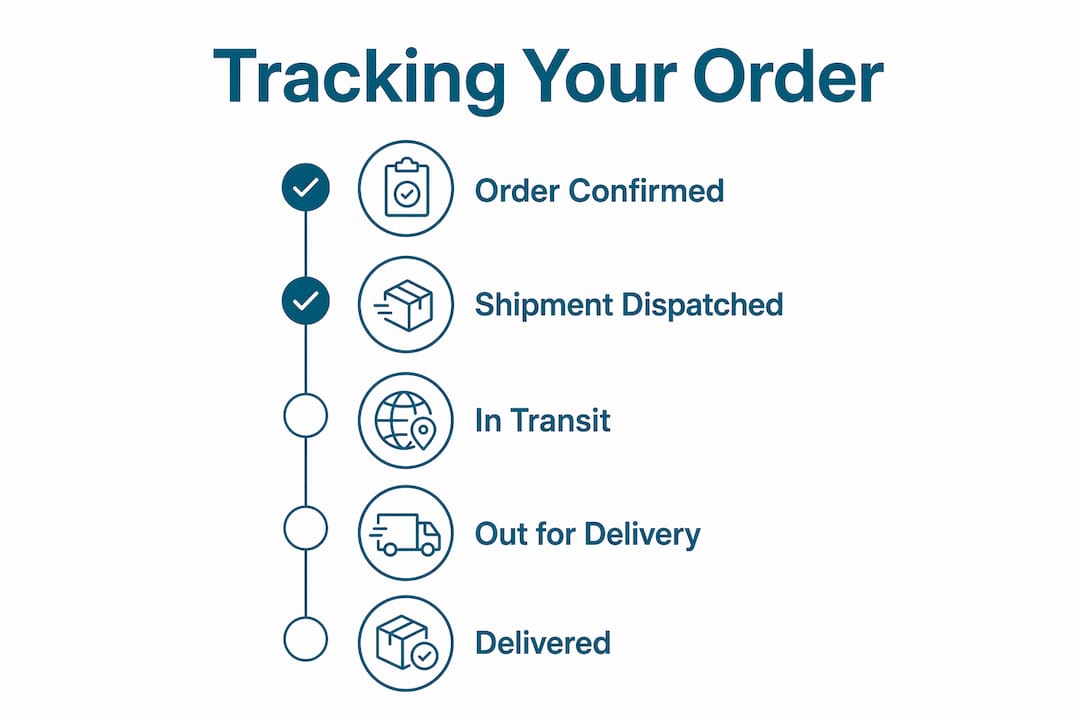
Start with the shipment confirmation. The tracking number in that email is your key to live data. Click the carrier tracking link directly from the notification rather than searching for it separately. Carriers like UPS, FedEx, USPS, and DHL each maintain real-time tracking portals that update as your package moves through their network. The shipment tracking basics behind these portals rely on carrier milestone events, specifically In Transit, Out for Delivery, and Delivered, rather than inferred timing. This means the status you see reflects an actual scan at a facility, not an estimate.
When you receive a delivery exception alert, read it carefully before contacting anyone. Most exceptions include a reason code and a recommended action. A “delivery attempted, no one home” exception usually means the carrier will retry the next business day or hold the package at a local facility for pickup. An “address issue” exception requires you to contact the seller to update your shipping details. Acting on the notification directly resolves most exceptions without a support call.
Pro Tip: Before contacting customer service about a delayed shipment, gather your order number, tracking number, and the most recent notification you received. Customer service agents can resolve issues significantly faster when you arrive with this information ready. Screenshot the notification if the status seems stuck or contradictory.
Managing your notification preferences also matters. Most ecommerce platforms and carrier apps let you choose which milestones trigger alerts and through which channel. If you find email notifications easy to miss, switch critical updates to SMS. If you are receiving too many in-transit updates for a long-distance shipment, reduce the frequency to key milestones only. The goal is staying informed without being overwhelmed. Parcel tracking systems that combine carrier data with customer-facing alerts make this level of control increasingly accessible.
Key takeaways
Order tracking notifications are most effective when they deliver complete, milestone-based shipment data through the fastest channel available to the customer.
| Point | Details |
|---|---|
| Notifications cover six core stages | Expect alerts for order confirmation, shipment, in transit, out for delivery, delivered, and exceptions. |
| Automation relies on complete data | Missing tracking fields in API fulfillment updates silently prevent notification emails from sending. |
| SMS and WhatsApp beat email for urgency | Use faster channels for critical milestones like out-for-delivery or failed delivery attempts. |
| Audit dashboards prevent disputes | AfterShip logs notifications for up to 120 days, giving sellers proof of customer communication. |
| Act on exceptions immediately | Delivery exception alerts include the reason and next step. Acting within hours prevents returns. |
Why notification design is the most underrated part of ecommerce
I have reviewed hundreds of post-purchase flows across ecommerce brands, and the pattern is consistent: sellers invest heavily in the checkout experience and almost nothing in what happens after the buy button. The notification a customer receives three days later, when their package is stuck in a transit hub, is often a plain-text email with a tracking number and no link. That is a failure of communication, not logistics.
What customers actually want is not more notifications. They want fewer, better ones. A single “out for delivery” SMS at 8 a.m. is worth more than five generic “your order is on its way” emails spread across a week. The brands that understand this send notifications that answer the question the customer is already asking, before they have to ask it.
The channel question is also more nuanced than most sellers admit. Email works for order confirmations because customers expect to archive them. It fails for time-sensitive alerts because inboxes are noisy. WhatsApp and SMS have open rates that email cannot match, and for a “delivery attempted” alert, those extra minutes of visibility can mean the difference between a successful delivery and a return-to-sender. I have seen brands cut WISMO contacts by a significant margin simply by moving their out-for-delivery alert from email to SMS. No new technology required.
The other thing I keep seeing is notification content that tells customers what happened but not what to do. A delivery exception message that says “delivery failed” without a next step is worse than no message at all. It creates anxiety without resolution. The best notifications I have encountered read like a brief from a trusted colleague: here is what happened, here is why, here is what you should do now.
— Maayan
How Or-ner keeps your shipments visible from dispatch to door
Or-ner’s global logistics platform connects ecommerce sellers to real-time shipment tracking across ocean, air, and land transport modes, with automated delivery status updates built into every fulfillment workflow. When your order ships through Or-ner’s network, you receive accurate, milestone-based alerts without gaps or delays. The platform’s exception management tools flag delivery issues the moment they occur, so sellers can act before customers need to ask. For ecommerce businesses looking to reduce support inquiries and build post-purchase trust, Or-ner’s freight booking guide walks through how to integrate tracking and notification automation from the first shipment.
FAQ
What are order tracking notifications?
Order tracking notifications are automated messages sent to customers at key shipment milestones, including order confirmation, shipping, in transit, out for delivery, and delivered. They typically include a tracking number, carrier name, estimated delivery date, and a link to live tracking.
Why am I not receiving shipment tracking alerts?
Missing notifications are most often caused by incomplete fulfillment data on the seller’s side, specifically a missing tracking number, carrier name, or tracking URL in the API update. Check your spam folder first, then contact the seller to verify their fulfillment record is complete.
How do I track my order using the notification I received?
Click the carrier tracking link in your shipment confirmation email or SMS. This takes you directly to the carrier’s live tracking portal, where milestone scans like “In Transit” and “Out for Delivery” update in real time as your package moves.
What should I do when I get a delivery exception alert?
Read the exception reason in the notification before contacting anyone. Most exceptions include a recommended action, such as scheduling a redelivery or updating your address. Acting within a few hours of receiving the alert prevents the package from being returned to the sender.
Which channel is best for receiving delivery status updates?
SMS and WhatsApp are the most effective channels for time-sensitive milestones like “Out for Delivery” or “Delivery Attempted” because open rates are significantly higher than email. Email works well for order confirmations and documents you need to save.