TL;DR:
- Integrating logistics with ecommerce automates order flow, reducing errors and enhancing customer satisfaction.
- A central OMS and a canonical data model streamline system compatibility, making future updates easier.
Integrating logistics with ecommerce is the automated process of connecting your sales platforms with fulfillment and shipping systems to synchronize order data, inventory, and delivery in real time. The industry term for this is logistics information integration, and it covers every handoff from checkout to doorstep. When done right, 100% of order data flows automatically between systems, eliminating incorrect addresses and misrouted shipments. That level of automation is no longer a competitive advantage. For ecommerce businesses operating in 2026, it is the baseline for staying profitable and keeping customers satisfied.
What are the main components of ecommerce logistics integration?
Logistics integration connects several distinct systems that rarely speak the same language out of the box. Understanding what each one does, and how they talk to each other, is the foundation of any successful integration project.
The core systems involved:
- Ecommerce platform (Shopify, Magento, BigCommerce): the source of truth for orders and customer data
- Order Management System (OMS): the central coordinator that routes orders to the right fulfillment location
- Warehouse Management System (WMS): controls picking, packing, and inventory within each facility
- Enterprise Resource Planning (ERP): manages financials, procurement, and broader business data
- Transportation Management System (TMS): handles carrier selection, rate shopping, and shipment tracking
- 3PL carrier systems: external fulfillment partners that need real-time data feeds
Integration methods determine how these systems exchange data. APIs are the most common approach for real-time, request-based communication. EDI (Electronic Data Interchange) remains standard for large retailers and carriers that use fixed message formats. iPaaS platforms (Integration Platform as a Service) act as middleware to connect multiple systems without custom code for each pair. Webhooks and event streaming push data instantly when something changes, such as when an order ships or inventory drops below a threshold.
One of the most underused techniques is the canonical data model. Instead of building a direct mapping between every pair of systems, you define one standard format for orders, shipments, and inventory. Every system maps to that single format. This cuts future onboarding and maintenance effort by more than half.

Pro Tip: Use an event broker like Amazon EventBridge to queue data between your ecommerce platform and backend ERP or WMS. Pushing events directly to backend systems during peak volumes can overload them. A queue absorbs the spike and throttles delivery at a rate your systems can handle.
How does integrated logistics improve supply chain performance?
The operational gains from tight logistics integration show up in three areas: error reduction, cost control, and customer experience.
Fragmented infrastructures and poor interoperability cause delays, excess inventory, and higher per-order costs. That is the baseline most ecommerce businesses start from. Integration removes the manual steps that create those gaps.
On the error side, automating data transfer means addresses, SKUs, and quantities move between systems without human re-entry. The result is near-zero misrouted shipments and a measurable drop in return-to-sender rates. On the cost side, real-time inventory visibility across fulfillment centers lets your OMS route each order to the nearest stocked location. Fewer split shipments mean fewer boxes, less freight, and lower cost per order.
Customer experience improves because real-time order synchronization prevents overselling and stockouts. When a customer sees “in stock” at checkout, that promise is backed by live data, not a spreadsheet updated yesterday. Immediate tracking updates after shipment reduce “where is my order” contacts, which is one of the highest-volume support categories in online retail.
The metrics that move most visibly after integration include:
- Delivery success rate: fewer failed attempts from address errors
- Return-to-sender rate: drops when address validation runs automatically
- Logistics cost per order: falls when intelligent routing reduces split shipments
- Customer satisfaction score: rises when tracking is accurate and proactive
Connecting your inventory management practices to your fulfillment layer is where most of these gains originate.
What are the common pitfalls in logistics integration?
Most integration projects fail not because of bad technology choices, but because of avoidable architectural and operational mistakes.
The five most common pitfalls, and how to avoid them:
-
Point-to-point spaghetti integrations. Connecting every system directly to every other system creates a web that breaks whenever one system changes. Use a canonical data model and a central integration layer instead.
-
Ignoring peak load capacity. Black Friday and holiday surges can send order volumes 5–10x above normal. Systems that work fine at average load will fail under that pressure. Test at peak volumes before go-live, and use event brokers to queue traffic.
-
Skipping idempotency. An idempotent operation produces the same result whether it runs once or ten times. Without it, network retries create duplicate orders or double-charged shipments. Build idempotency into every API endpoint and event handler from day one.
-
No observability dashboard. You cannot fix what you cannot see. Centralized monitoring with SLA alerting focused on business impact (delayed orders, failed shipments) gives your team the visibility to catch problems before customers do.
-
Treating integration as a one-time project. Carrier APIs change. Platforms release new versions. 3PL partners update their systems. Build a maintenance budget and a review cadence into your integration plan from the start.
Pro Tip: Map your existing system connections before writing a single line of integration code. Draw every data flow on a whiteboard. If it looks like spaghetti, your architecture will behave like spaghetti under load.
What steps should you follow to implement logistics integration?
A structured rollout prevents the most common failures. The steps below reflect how mature ecommerce operations approach this work.
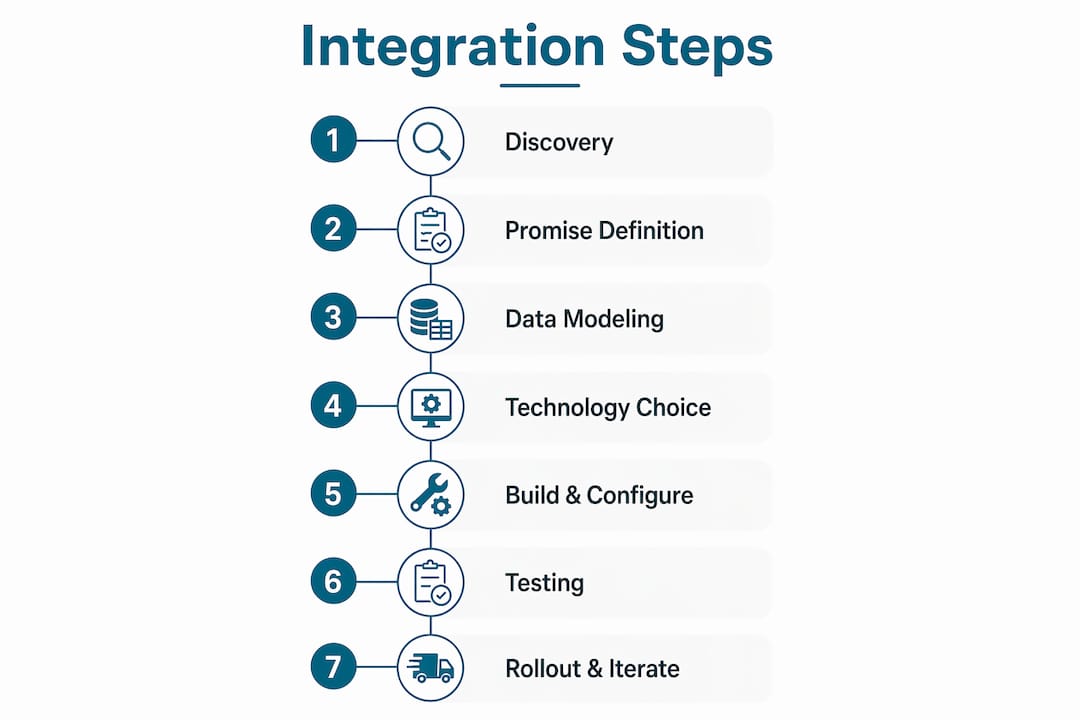
1. Discovery and system mapping. List every system in your current stack and every data flow between them. Include your 3PL partners and carrier APIs. Identify where manual steps exist today.
2. Define your customer promises. Set your SLAs before you design anything. What is your same-day cutoff? What is your maximum delivery window by region? These promises drive every routing and inventory rule downstream.
3. Design the canonical data model. Define standard formats for orders, shipments, inventory updates, and returns. Every system in your stack maps to this model. This is the single decision that most reduces long-term maintenance cost.
4. Choose your integration technology. For most mid-market ecommerce businesses, an iPaaS platform handles the bulk of connections. Add webhooks for real-time triggers and an event broker for high-volume flows. Review warehouse management best practices to align your WMS configuration with your integration design.
5. Build and configure. Develop APIs, webhooks, and connectors. Configure your middleware or event broker. Set up your OMS as the central routing brain. A well-configured OMS coordinates carrier selection and fulfillment routing while letting your ERP and WMS retain ownership of their own data.
6. Test thoroughly. End-to-end testing must cover split shipments, returns, multi-carrier scenarios, and peak volume simulations. Validate serialization, idempotency, and error handling before any order touches a live customer.
7. Roll out and iterate. Start with your highest-volume order flows. Monitor SLAs daily in the first weeks. Build a feedback loop with your 3PL partners and warehouse teams. Adjust routing rules and thresholds based on real performance data.
The table below summarizes the key decision at each stage:
| Stage | Key Decision |
|---|---|
| Discovery | Map all systems and manual handoffs |
| Promise definition | Set SLAs and delivery targets by region |
| Data model design | Define canonical formats for orders, shipments, inventory |
| Technology selection | Choose iPaaS, event broker, and API approach |
| Testing | Validate edge cases: returns, splits, peak loads |
| Rollout | Start with critical flows, monitor SLAs, iterate |
For businesses shipping internationally, cross-border logistics adds customs clearance and duty calculation as additional integration layers to plan for. Ecommerce platforms like BigCommerce also offer automation features that can reduce the manual configuration burden on the platform side of your integration.
Key Takeaways
Effective logistics integration requires a canonical data model, a central OMS as the routing brain, and rigorous testing across peak volumes and edge-case order types.
| Point | Details |
|---|---|
| Automate all data flows | Push 100% of order and customer data automatically to eliminate address errors and misrouted shipments. |
| Use a canonical data model | Standardize order, shipment, and inventory formats to cut integration maintenance effort by more than half. |
| Queue events at peak loads | Use an event broker to throttle data flow and prevent backend system overload during high-volume periods. |
| Set SLAs before you build | Define delivery promises and inventory rules first so every routing decision supports your customer commitments. |
| Test edge cases before launch | Validate split shipments, returns, and multi-carrier flows before any live order touches the integration. |
What I’ve learned about logistics integration after years in ecommerce ops
Most teams approach integration as a data centralization problem. They want one database with everything in it. That instinct leads to over-engineered architectures that are brittle and slow to change.
The better mental model is orchestration. Your OMS does not need to own all the data. It needs to know enough to make the right routing decision and then hand off to the system that does own the data. Your WMS knows what is on the shelf. Your ERP knows what is on order. The OMS coordinates between them. That separation of ownership is what makes the architecture resilient.
The other thing I have seen teams consistently underestimate is the 3PL relationship. The best technology integration fails if your 3PL partner cannot respond to exception events in real time. Before you commit to an integration architecture, audit your partners’ API capabilities and their SLA for data response times. A partner who batches updates every four hours is not compatible with a real-time integration promise.
Start with your two or three highest-volume order flows. Get those right. Measure the results. Then expand. Teams that try to integrate everything at once almost always stall out halfway through and end up with a half-integrated system that is worse than what they started with.
— Maayan
Or-ner’s logistics solutions for ecommerce integration
Ecommerce businesses that want to move from manual processes to a fully connected logistics operation need a courier and fulfillment partner built for that level of coordination.
Or-ner provides reliable courier services designed specifically for ecommerce operators, with real-time shipment tracking, bulk label printing, and returns management built into the platform. Or-ner integrates with major ecommerce operators including Amazon, supports multi-carrier routing, and connects to warehouse and inventory systems across ocean, air, and land transport modes. For businesses scaling into cross-border trade, Or-ner’s global fulfillment network handles customs clearance and last-mile delivery without requiring separate vendor relationships. If you are ready to connect your sales platform to a logistics operation that performs at volume, Or-ner’s team can map the right solution to your current stack.
FAQ
What does integrating logistics with ecommerce mean?
Logistics integration is the automated connection of your ecommerce sales platform with fulfillment, inventory, and shipping systems so that order data flows between them without manual entry. The goal is real-time synchronization across every step from checkout to delivery.
What is a canonical data model in logistics integration?
A canonical data model is a single standard format for orders, shipments, and inventory that every system in your stack maps to. It replaces direct point-to-point mappings and reduces integration maintenance effort by more than half as your system count grows.
How do I prevent system overload during peak sales periods?
Use an event broker such as Amazon EventBridge to queue and throttle data flowing to your ERP and WMS. Pushing events directly to backend systems during high-volume periods like Black Friday can cause failures. A queue absorbs the spike and delivers data at a rate your systems can process.
Which systems are most critical to connect first?
Start with your OMS, ecommerce platform, and WMS. These three systems handle order routing, inventory availability, and fulfillment. Getting this core triangle integrated and tested delivers the largest immediate reduction in errors and fulfillment delays.
How does logistics integration affect customer satisfaction?
Real-time inventory synchronization prevents overselling and stockouts, so the promise made at checkout matches what actually ships. Automated tracking updates reduce customer support contacts and build trust in your brand’s delivery reliability.