Airnet courier tracking, in the platform sense that matters for ecommerce operations, means AWB-based air freight tracking pulled together by a logistics or 3PL platform into one timeline. The first action is simple: locate or enter the 11-digit air waybill (AWB) number in your platform and turn on live event updates, whether that’s an API feed, a webhook, or scheduled polling.
Three signals tell you tracking is actually working, not just installed:
- The AWB resolves against the carrier’s system (no “unknown shipment” error).
- A first milestone has been scanned, usually labeled MAN or ACCEPTED.
- The platform shows an upcoming ETD or ETA rather than a blank field.
If any of those three is missing, you don’t have tracking. You have a tracking number sitting in a database doing nothing.
Key Takeaways
Reliable air freight visibility depends on correct AWB registration, standardized carrier integrations, and automated exception rules working together as one system.
| Point | Details |
|---|---|
| AWB is the tracking key | The 11-digit AWB (3-digit prefix plus 7-digit serial) is what lets a platform aggregate events across carriers. |
| Standards reduce blind spots | IATA ONE Record outperformed tailored software in cross-stakeholder digitalization testing, cutting format-translation gaps. |
| Centralization saves time | One operator case study cut booking time from 18-22 minutes to 7-9 minutes per shipment after centralizing tracking. |
| Automation cuts inquiries | Control-tower style setups have reported milestone compliance near 90% with a 25% drop in customer inquiries. |
| Or-ner unifies the workflow | Or-ner’s platform aggregates AWBs, connects carrier feeds, and automates exception alerts in one dashboard. |
Table of Contents
- What Is Airnet Courier Tracking and How Does It Work?
- What Do Airnet Tracking Milestones Actually Mean?
- How Do You Set Up AWB Tracking Inside a Logistics Platform?
- How Do You Troubleshoot Tracking Gaps and Exceptions?
- What’s the Deployment Checklist for Reliable Air Tracking?
- Why Visibility Is a Revenue Lever, Not Just an Ops Fix
- Get AWB Tracking, Exception Alerts, and Multi-Carrier Visibility in One Platform
- Sources
- FAQ
What Is Airnet Courier Tracking and How Does It Work?
The system runs on one number: the 11-digit AWB. It breaks into a 3-digit airline prefix and a 7-digit serial, and that combination is the tracking key roughly 400 cargo-capable carriers recognize. Every scan, transfer, and customs action gets logged against that number, which is why a logistics platform can aggregate air freight from multiple airlines into a single dashboard instead of forcing you to check five carrier portals.
Carriers publish shipment events using the Cargo-IMP messaging standard, or increasingly Cargo-XML and direct APIs. A 3PL platform ingests these through three channels:
- Direct carrier APIs for airlines that support modern integrations.
- EDI feeds for legacy systems still running Cargo-IMP formats.
- Webhooks, where the carrier pushes an event the moment it happens instead of waiting to be asked.
The newer layer worth knowing is IATA ONE Record, a data-sharing standard built to replace fragmented messaging with a single structured model every stakeholder can query the same way. A 2025 systems evaluation found ONE Record outperformed tailored, carrier-specific software when tested for cross-stakeholder digitalization, largely because it removes the translation step between formats.
The data flow, end to end, looks like this: origin warehouse scan, first-mile pickup, airport acceptance, flight departure, arrival, customs clearance, then last-mile handoff. Cloud-native cargo platforms stitch these events together using API/EDI ingestion plus IoT sensor data where it’s available, which is what lets a dashboard show near real-time status instead of a stale snapshot from this morning.
What Do Airnet Tracking Milestones Actually Mean?
Cargo-IMP and related standards use short codes that mean nothing to most people until someone translates them. Here’s what the common ones tell you operationally:
- MAN (Manifested): the shipment is booked on a specific flight. No customer notification needed yet.
- DEP (Departed): wheels up. Update your ETA field and, for customer-facing tracking, this is the point to send a “shipment in transit” notice.
- ARR (Arrived): the aircraft landed. Now check whether customs clearance is required before the next scan.
- CLR (Cleared): customs released the shipment. If this event is late or missing, that’s your first sign of a hold.
Beyond the code itself, four fields deserve a second look on every shipment: last known location, current handler (airline, ground handler, or broker), customs flag status, and the ETD/ETA pair. A code without those four data points is close to useless for decision-making.
Set escalation rules around specific gaps, not just specific codes. A shipment with no scan for more than 24 hours past its expected transit window, or a CLR event that never arrives within the standard customs window for that lane, should auto-flag for a human to look at. Industry observations suggest that customers who can self-serve a translated, plain-language tracking page are far less likely to open a dispute and more likely to order again, which is a strong argument for translating MAN/DEP/ARR/CLR into words before a shopper ever sees them.
How Do You Set Up AWB Tracking Inside a Logistics Platform?
Getting from “we have an AWB” to “we have working automation” is a sequence, not a single toggle.
- Register the AWB. Add it individually for one-off shipments, or bulk-upload a CSV for volume shippers. Confirm the platform resolves each number against the correct airline prefix before moving on. This is also where freight booking platforms generate the AWB automatically at time of booking, which removes a manual entry step entirely.
- Connect the carrier feed. Link the carrier’s API, EDI connection, or webhook. Webhooks push updates the instant they happen; API polling is fine but should run frequently enough that a shipment never goes more than a few hours without a refresh.
- Configure exception rules. Set specific triggers: customs hold flagged, no scan past a defined dwell window, or a missed flight connection. Each rule needs an owner, not just an alert.
- Turn on notifications. Route internal alerts to the ops team and translated, customer-friendly updates to buyers automatically at key milestones like departure and clearance.
- Monitor post-launch KPIs. Track milestone compliance rate, average customs dwell time, and exceptions-per-shipment weekly, not just when something breaks.
Pro Tip: Set your API polling cadence based on shipment value, not a blanket rule. High-value or time-critical freight can justify near real-time webhook feeds; low-priority bulk cargo can run on a slower polling interval without losing much operational value.
Centralizing carrier checks into one dashboard has measurable payoff. One logistics operator case study reported booking time dropping significantly per shipment once staff stopped checking carrier portals one by one. Separately, control-tower style implementations that consolidate milestone updates and automate exception routing have reported milestone compliance near 90% alongside a 25% drop in customer inquiries. That’s the difference between a team that reacts to problems and one that gets ahead of them.
How Do You Troubleshoot Tracking Gaps and Exceptions?
Most tracking blind spots trace back to three causes: a missing AWB-to-shipment mapping, an interline leg where the second carrier doesn’t feed data back cleanly, or a station still logging updates manually instead of scanning into a system. Knowing which one you’re dealing with cuts resolution time significantly.

Customs hold: Verify all commercial documents are attached in the platform. Contact your customs broker directly rather than waiting on an automated update. Attach any missing paperwork, since incomplete shipment data is a documented driver of extended dwell time.
Missed connection: Check rebooking options with the carrier or ground handler immediately. Update the customer-facing ETA before they ask, not after.
Unknown or dead AWB: Confirm the 3-digit prefix matches the issuing airline. A large share of “no tracking data” cases turn out to be a prefix mismatch or a missing interline mapping, not an actual lost shipment. Check the original booking documents before escalating to platform support.
Pro Tip: Before opening a support ticket for a dead AWB, re-enter the number manually and double-check for a transposed digit. Simple typos in the 7-digit serial cause more false “unknown shipment” alerts than actual system failures.
What’s the Deployment Checklist for Reliable Air Tracking?
Deploying this properly means sequencing four phases correctly instead of skipping straight to “turn on notifications.”
- Pre-booking: Collect accurate consignee details, commodity descriptions, and HS codes, plus digital copies of all shipping documents, before the AWB is even issued.
- Technical setup: Connect carrier APIs or EDI feeds, enable webhooks where supported, and map every incoming field to your platform’s AWB record correctly.
- Operational rules: Define notification triggers, set SLA thresholds for each milestone, and assign a named owner to every exception category.
- Post-launch measurement: Track milestone compliance rate, average customs dwell time, and your WISMO (“where is my order”) contact rate.
Skip step one and step three will fail no matter how good your API connection is. Bad commodity data at booking is what generates the customs hold you’ll be firefighting three days later.
Why Visibility Is a Revenue Lever, Not Just an Ops Fix
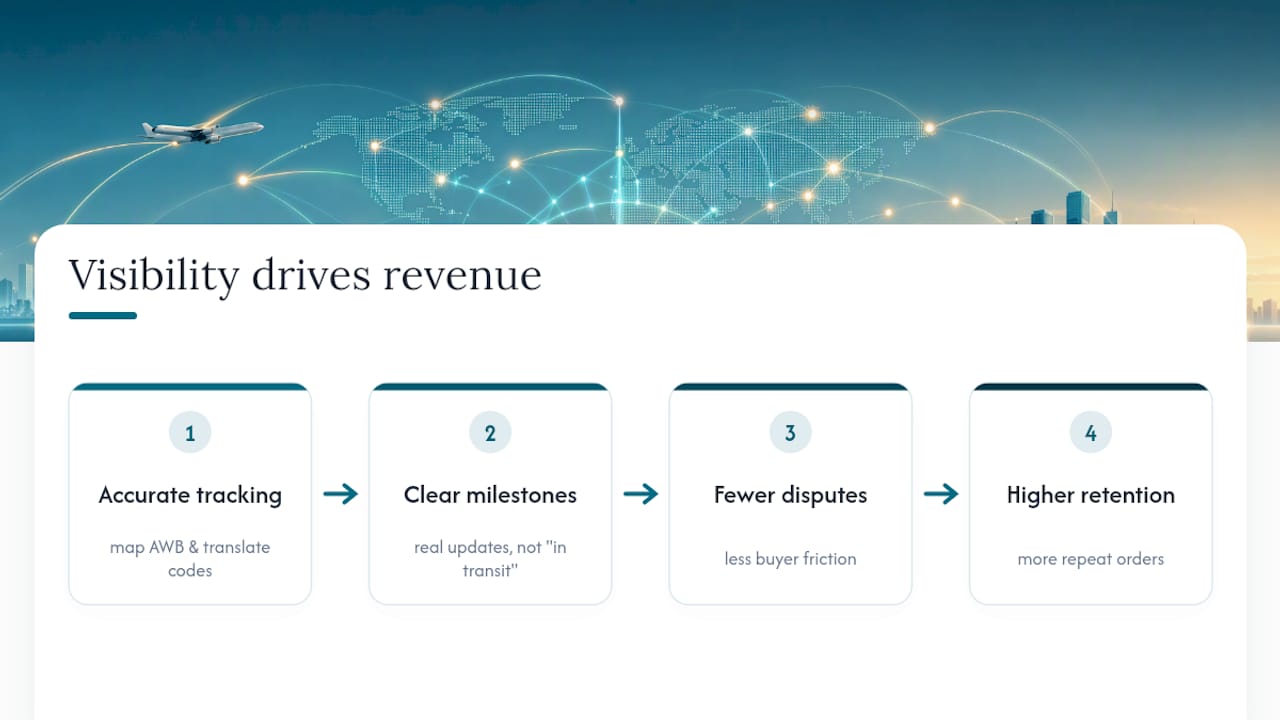
Teams tend to treat tracking accuracy as a cost center. It’s closer to a retention tool. When a buyer can see a real milestone instead of a generic “in transit” message, they file fewer disputes and come back to order again. The unglamorous work of mapping AWB fields correctly and translating carrier codes into plain language is where that outcome actually gets built, not in the marketing copy on your storefront.
Get AWB Tracking, Exception Alerts, and Multi-Carrier Visibility in One Platform
Or-ner runs AWB aggregation, carrier webhook connections, and exception management inside one dashboard, so your team stops toggling between five airline portals to find one shipment’s status.
If you’ve been piecing together tracking from carrier emails and manual spreadsheet updates, the gap isn’t effort, it’s infrastructure. Or-ner registers AWBs individually or in bulk, resolves them against the correct carrier automatically, and routes customs holds or missed connections to the right person the moment they’re flagged, instead of waiting for a customer complaint to surface the problem. For sellers moving volume through air freight, that’s the difference between chasing status updates and running a dashboard that tells you what needs attention right now. Check out Or-ner’s reliable courier services to see how AWB tracking and exception handling fit into your existing freight and fulfillment workflow.
Sources
- Cargo‑IMP standard and AWB usage
- Digitalization strategy for air cargo supply chains (IATA ONE Record evaluation)
- How air cargo tracking works: a step‑by‑step guide
- Why a global air freight control tower beats fragmented milestone updates
FAQ
What Is an AWB Number in Air Courier Tracking?
An AWB, or air waybill, is an 11-digit number made of a 3-digit airline prefix and a 7-digit serial that identifies an air shipment across every carrier system it touches.
Why Does My Tracking Show No Events at All?
Usually the prefix doesn’t match the issuing airline, or there’s a missing interline mapping between carriers. Check the original booking documents before assuming the shipment is lost.
What Does a CLR Status Code Mean?
CLR means the shipment has cleared customs. If it’s overdue past the standard clearance window for that lane, treat it as a signal to check for a hold.
Can a 3PL Platform Track Shipments From Multiple Airlines at Once?
Yes. A platform like Or-ner aggregates AWBs from multiple carriers into one dashboard using API, EDI, and webhook connections, so you’re not checking separate carrier portals for each shipment.
How Often Should Tracking Data Refresh?
Near real-time, via webhooks, works best for high-value or time-sensitive freight. Standard API polling every few hours is usually sufficient for lower-priority bulk shipments.