
What makes a perfect email work?
The best professional emails share five qualities: they are Clear, Concise, Correct, Complete, and Courteous. This framework, widely known as the 5 Cs, gives you a reliable checklist before you hit send on anything that matters. Apply all five and your emails get read, understood, and acted on. Skip even one and you risk confusion, silence, or a reply that asks for everything you forgot to include.
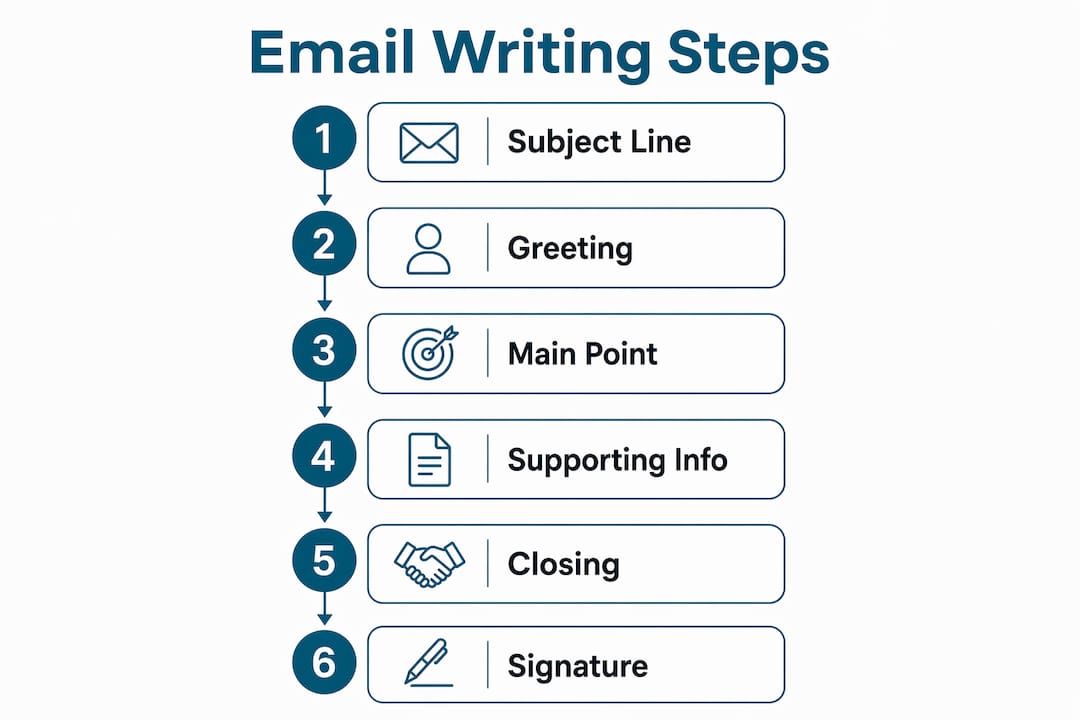
Every well-written email is built from the same core components:
- Subject line: A brief, specific preview of what the email is about
- Greeting: An appropriate salutation matched to your relationship with the recipient
- Body: The message itself, ideally 50–125 words for maximum effectiveness
- Call to action: A clear statement of what you need and when
- Signature: Your name, title, and contact details
Tone and content should always match your audience. A message to a new client calls for more formality than a quick update to a colleague you’ve worked with for years. Getting that calibration right is half the battle.
How to write subject lines and salutations that actually get results
The subject line is the first thing your recipient sees, and 47% of recipients decide whether to open an email based on it alone. Keep yours under 50 characters and make it specific. “Meeting” tells the reader nothing. “Marketing strategy meeting: Tuesday 2 PM confirmation needed” tells them everything.
A few subject line principles worth following:
- Be specific, not clever. Vague subject lines get skipped or deprioritized.
- Match the subject to the email’s purpose. If you’re asking for a decision, say so.
- Flag urgency when it’s real. “[URGENT]” at the start of a subject line is acceptable when the situation genuinely warrants it, not as a default.
- Avoid all caps in the subject line. It reads as aggressive and unprofessional.
For salutations, the rule is simple: match your greeting to the relationship and the context. “Dear Professor Chen” works for a first email to a faculty member. “Hi Marcus” is fine once you’ve established a working rapport. Avoid “Hey” in any professional setting, and skip gendered honorifics unless you know the recipient’s preference. When in doubt, mirror how they sign their own emails to show respect for their identity.
Formal greetings: “Dear Dr. Patel,” / “Dear Ms. Rivera,”
Semi-formal: “Hello James,” / “Good morning, Sarah,”
Established relationship: “Hi Tom,” / “Hey Priya,” (internal, casual culture only)
How to compose an email body that respects the reader’s time
Lead with your main point. The military communication technique called Bottom Line Up Front, or BLUF, puts the core request or information in the first sentence rather than building up to it. Readers scan emails fast, and burying your ask in paragraph three means it often gets missed entirely.
Keep the body tight. Research from Boise State University’s Writing Center confirms that 50–125 words is the optimal range for professional email bodies. That’s roughly three to five short paragraphs. If your message runs longer, you probably need a document, not an email.
Structure the body with these principles in mind:
- One or two ideas per sentence. Long, clause-heavy sentences slow comprehension.
- Short paragraphs. Four to five sentences maximum per paragraph.
- Bullet points for lists or multiple requests. They’re faster to scan than prose.
- Enough context, nothing extra. Give the recipient what they need to act, not your full thought process.
- A clear call to action. Specify exactly what you need and by when. “Please confirm by Friday, March 14” beats “let me know when you get a chance.”
Pro Tip: Read your email aloud before sending. If you stumble over a sentence or the tone sounds off, it will land the same way for your reader. This single habit catches more problems than any grammar checker.
For routine requests, go direct: state the ask, give the context, close. For complex or sensitive messages, a slightly indirect approach works better. Acknowledge the situation first, then move to what you need. This is especially true when delivering bad news or making a difficult request.

How to maintain professional tone and etiquette in emails
Tone is the most misread element of any email. Without facial expressions or vocal cues, a message that feels neutral to you can read as cold, demanding, or dismissive to the person receiving it. Reading emails aloud before sending, as the Emily Post Institute recommends, is one of the most reliable ways to catch tone problems before they cause damage.
A few firm rules on tone and email etiquette:
- Never use all caps. It reads as shouting, full stop.
- Limit exclamation marks. One per email is plenty in a formal context. More than that undermines your credibility.
- Skip emojis in external or formal emails. They’re fine in a casual Slack message; they’re out of place in a client proposal.
- Stay positive, even when the news isn’t. Acknowledge problems, but frame your message around what happens next.
- Respond to every question raised. Ignoring a point in a previous email signals either carelessness or avoidance.
Pro Tip: Pay attention to how your recipient signs their emails and what title they use. Matching their style, whether that’s “Dr. Kim” or just “Alex,” signals that you’ve paid attention and you respect how they present themselves.
Formality should flex with context. A first email to a new contact at another company warrants more care than a follow-up to someone you’ve emailed a dozen times. The goal isn’t stiffness; it’s appropriateness. When you’re writing to someone in a different field or culture, business communication skills become even more critical, since assumptions about tone don’t always travel well across industries.
How to structure emails so they’re easy to scan and act on
Formatting is not decoration. It’s how you make sure your message gets read the way you intended. Emails formatted in block style, meaning left-justified, single-spaced with a blank line between paragraphs, are easier to read than dense walls of text. White space is your friend.
For longer emails, these formatting choices make a real difference:
- Bold key deadlines or action items. If there’s one date the reader must not miss, bold it.
- Use bullet points for multiple requests. Numbered lists work even better when sequence matters.
- Place the call to action early. Don’t make the reader scroll to find out what you need. If the email is complex, repeat the ask at the close.
- Keep paragraphs to four or five sentences maximum. Longer than that and readers start skimming.
- Include a professional signature. At minimum: your full name, title, company, phone number, and email address. Make sure it renders cleanly on mobile.
Attachments and links deserve a brief explanation. Never send a file without naming it and stating why it’s attached. “Please find attached the Q1 report referenced in our call” is better than a silent attachment. For large files, a shared Google Drive or Dropbox link avoids inbox size limits and is easier for the recipient to access later.
Common mistakes that undermine professional emails
Even experienced writers fall into these traps. Recognizing them is the first step to avoiding them.
- Vague subject lines. “Following up” or “Quick question” tell the reader nothing and often get deprioritized.
- Emails that are too long. If your message exceeds 125 words, ask whether some of it belongs in a separate document or meeting.
- Inconsistent tone. Switching between formal and casual within the same email reads as unpolished.
- Skipping proofreading. Spelling and grammar errors undermine your credibility immediately, regardless of how strong your content is.
- No clear call to action. Emails that end without specifying what you need next generate follow-up emails asking exactly that.
- Misusing “Reply all.” Reply all should be used carefully to avoid sending irrelevant information to people who don’t need it. If your response is only relevant to the sender, reply to them alone.
- Missing or incomplete signature. Every professional email should close with your name and at least one way to reach you. Omitting it forces the recipient to dig through their inbox for your contact details.
One mistake that catches people off guard: sending an email before you’ve confirmed the recipient list. Adding someone to CC or BCC after the fact, or accidentally including the wrong person, can create real problems. Check the “To” field before you write a single word of the body.
The 5 Cs of professional email writing explained
The 5 Cs framework is the most practical quality check available for professional email writing. Communication professionals use it as a pre-send review, and it works whether you’re drafting a job application or a vendor request.
Here’s what each C means in practice:
- Clear: Your message has one unambiguous purpose. The recipient knows exactly what you need after one read. Avoid jargon, vague language, and sentences that could be interpreted two ways.
- Concise: Respect the reader’s time. Keep the body to 50–125 words, use short sentences with one or two ideas each, and cut anything that doesn’t serve the main point.
- Correct: Check grammar, spelling, and factual accuracy. A single error can shift the reader’s focus from your message to your credibility. Tools like Grammarly or the built-in spell-check in Gmail and Outlook catch most surface errors, but a manual read catches tone problems they miss.
- Complete: Include everything the recipient needs to act without sending a follow-up. Anticipate their questions and answer them in the body. If you’re referencing a previous conversation, provide enough context so the email stands on its own.
- Courteous: Maintain a respectful tone throughout, even when the message is difficult. Open with a pleasantry, close with one, and address the recipient by name. A courteous email is more likely to get a prompt, cooperative response.
Pro Tip: Before sending any important email, run through the 5 Cs as a checklist. It takes thirty seconds and catches the problems that cost you hours of follow-up.
The 5 Cs also apply to email marketing strategy, where the same principles of clarity, brevity, and respect for the reader’s time drive open rates and conversions. The framework scales from a one-line reply to a full campaign.
Or-ner and clear communication in logistics

Clear, well-structured communication is the backbone of reliable logistics. At Or-ner, every shipment confirmation, customs update, and delivery notification is built on the same principles covered here: a clear subject, a direct message, and a specific next step. When you’re coordinating cross-border freight or managing fulfillment across multiple warehouses, ambiguous emails cost time and money.
Or-ner’s global logistics platform gives ecommerce sellers and businesses the tools to manage shipments, track deliveries in real time, and communicate with partners without the back-and-forth that slows operations down. Good email habits and reliable courier infrastructure work together.
Key Takeaways
Writing perfect emails consistently comes down to applying the 5 Cs framework: Clear, Concise, Correct, Complete, and Courteous, every time before you send.
| Point | Details |
|---|---|
| Subject line specificity | Keep subject lines under 50 characters and match them directly to the email’s purpose. |
| Optimal body length | Email bodies of 50–125 words get the best results; longer messages lose readers. |
| BLUF method | Lead with your main point in the first sentence so readers know immediately what you need. |
| Tone and etiquette | Avoid all caps, excess exclamation marks, and emojis in formal or external emails. |
| 5 Cs pre-send check | Run every important email through Clear, Concise, Correct, Complete, and Courteous before sending. |
FAQ
How do you write a perfect professional email?
Start with a specific subject line under 50 characters, open with an appropriate greeting, lead the body with your main point using the BLUF method, include a clear call to action, and close with a professional signature. Keep the body between 50 and 125 words for maximum effectiveness.
What are the 5 Cs of email writing?
The 5 Cs are Clear, Concise, Correct, Complete, and Courteous. Clear means one unambiguous purpose; Concise means 50–125 words with short sentences; Correct means accurate grammar and facts; Complete means all necessary context is included; Courteous means a respectful tone throughout.
What are the most important email etiquette rules?
Never use all caps, limit exclamation marks to one per formal email, avoid emojis in external messages, always reply to every question raised, use “Reply all” only when the response is relevant to the entire group, and always include a signature with your name and contact details.
How do you choose the right greeting for a professional email?
Match the greeting to your relationship and context. Use “Dear Dr./Mr./Ms. [Last Name]” for formal or first-contact emails, “Hello [First Name]” for established professional relationships, and mirror the recipient’s own signature style when you’re unsure of their preferred title or pronouns.
How long should a professional email be?
Research from Boise State University’s Writing Center puts the optimal range at 50–125 words for the email body. If your message consistently runs longer, consider whether some content belongs in an attached document or a scheduled meeting instead.